🤖Have you ever tried Chat.M5Stack.com before asking??😎

Subcategories

  • Lessons and Guides for Uiflow

    125 Topics
    434 Posts
    A
    Hi, I'm a new user of M5stack products, having got an M5StickC Plus2 recently. It's a nice device, but the documentation isn't always accurate which makes learning how to use it a slow process. I tried to use the example for drawing a raw buffer to the screen here But it resulted in different garbled output each time and not a green rectangle. It seems that the len parameter is expecting 16-bit entries in the buffer so needs to be halved. Here's the code that works on my device (note the //2 for len parameter): width, height = 40, 30 green565 = 0x07E0 raw_buf = bytearray(width * height * 2) for i in range(width * height): raw_buf[2*i] = (green565 >> 8) & 0xFF raw_buf[2*i+1] = green565 & 0xFF Display.drawRawBuf(raw_buf, 100, 100, width, height, len(raw_buf)//2, swap=False) Hopefully this will help others and eventually get changed in the docs - assuming it's the same for all UIFlow2 supported devices? If anybody knows a fix to make it work properly for lower than 16bit depth screens so I can draw a raw buffer to a 1-bit canvas properly, please let me know!
  • 211 Topics
    789 Posts
    robskiR
    @GiovanniCaenazzo disconnect M5Dial press and hold boot button at the back ofM5Dial - in the middle of Stamp Controller - it is very gentle switch connect M5Dial to USB M5Burner should detect com port in boot mode
  • 11 Topics
    33 Posts
    A
    @jeanfabre On web, just choice block type. [image: 1729260517944-86b7a25c93207d9a32e5b33471bb1f0.png] For code, add return description like this: def func(self) -> int: return 0
  • UiFlow (web) requests wrong firmware update

    3
    0 Votes
    3 Posts
    4k Views
    ZontexZ
    Hello, are you experiencing same issue with the desktop IDE? I'll note it down and look into it.
  • M5stickC Touch Sensing

    4
    0 Votes
    4 Posts
    8k Views
    X
    Thank you!
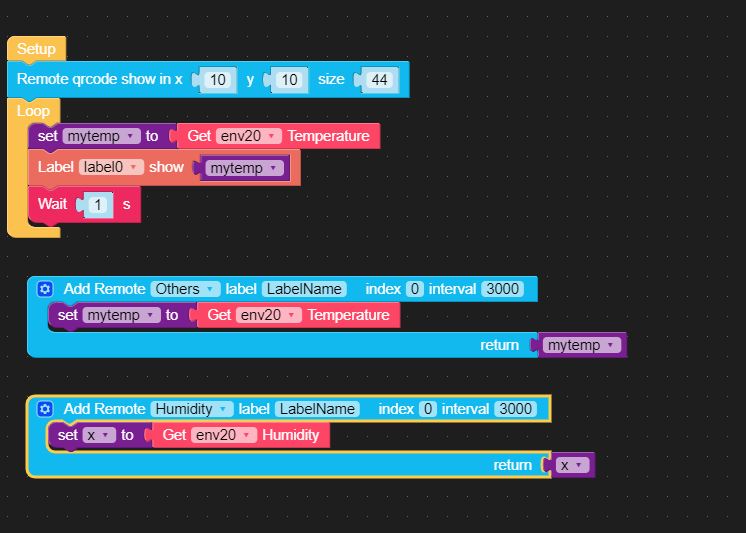
  • UIFlow Remote cannot get data

    2
    1
    0 Votes
    2 Posts
    4k Views
    m5stackM
    thank you feedback. we will test this function.
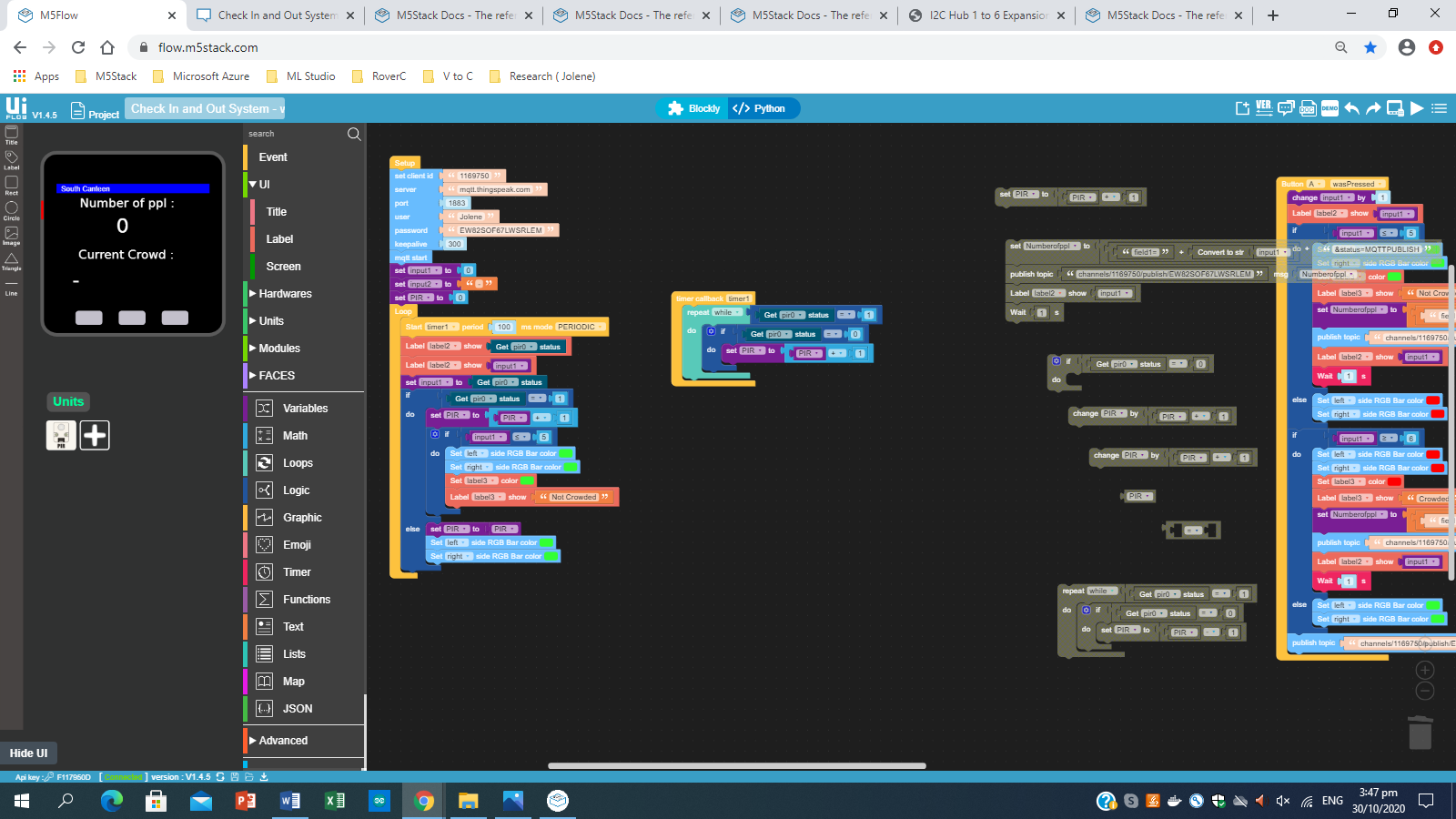
  • Check In and Out System for school project

    3
    1
    0 Votes
    3 Posts
    5k Views
    m5stackM
    why you put the timer start in the loop? I do not particularly clearly the functions implemented by the program
  • M5StickC ToF Hat UIFlow example missing?

    12
    0 Votes
    12 Posts
    13k Views
    M
    M5StickC and ToF Hat work great with firmware UIFlow 1.6.5.1 :) [image: uLQQGC.png]
  • UIFlow initiates AtomMatrix not correct when switching

    8
    0 Votes
    8 Posts
    12k Views
    world101W
    Looks like you got it working, but what I was referring to with the Execute block was adding the full command like this to see if it would override the first. [image: 1604065459161-screen-shot-2020-10-30-at-9.43.07-am-resized.png] In the Python tab it looks like the command duplicated. I don't have the AtomQR to test with, so I'm not sure if this works or not... [image: 1604066142567-screen-shot-2020-10-30-at-9.43.54-am-resized.png] However, I found another workaround without the Execute block. After loading the AtomicQR example flow, then switch from Atom-Lite to Atom-Matrix in the settings, it will indeed add rgb.set_screen([]) on the Python tab. This is the bug. If you just select one of the 25 LED squares in the UI editor to change it to white, then select the same square again to change it back to black. Check the Python tab again and it will now show rgb.set_screen([0,0,0,0,0,0,0,0,0,0,0,0,0,0,0,0,0,0,0,0,0,0,0,0,0]) automatically. If you save that as a new program (ex: Atomic_QR-Matrix), the next time you load the file, it should have the Matrix as the hardware type and the correct rgb.set_screen command in the python tab.

  • Traceback on AtomMatrix when running example

    7
    0 Votes
    7 Posts
    7k Views
    m5stackM
    it is an old version program compatible problem. now we updated a new example. https://github.com/m5stack/M5-ProductExampleCodes/tree/master/Core/Atom/Atom Matrix
  • Please provide UIFlow source code for ToF Hat

    2
    0 Votes
    2 Posts
    4k Views
    m5stackM
    thank you feedback. now it fixed. you could use the new firmware version UIFlow 1.6.5.1
  • UIFlow on core 2

    9
    0 Votes
    9 Posts
    16k Views
    m5stackM
    MacOS users please put M5Burner App in the Application folder after the installation as shown in the figure below. [image: application.webp]
  • Prevent autosleep

    1
    1 Votes
    1 Posts
    2k Views
    No one has replied
  • Prevent autosleep

    1
    0 Votes
    1 Posts
    2k Views
    No one has replied
  • DAC library in C convert to UIflow

    3
    0 Votes
    3 Posts
    7k Views
    K
    @gaviota I know this unit. But I have a unit on the MCP4728 chip. There are python libraries available but I can't make a custom block. Can you?
  • Tvoc in UIflow

    2
    0 Votes
    2 Posts
    5k Views
    R
    I'm interested too as I have this module. Have you found a way to use it? Regards, Eduardo
  • ERROR Invalid syntax (UIFlow 1.6.2) when trying to upload

    12
    0 Votes
    12 Posts
    22k Views
    A
    @m5stack FW1.6.4 and editor 1.0.12 totally broke my program, still can't upload but then again, why would I need to, it doesn't even run anymore, the python code gets screwed up. I don't get to make an app anymore, all I do is running into stuff that doesn't work. It seems to me M5stack is suffering from what I call the "Yamaha disease" : keep spitting out new hardware without fixing the mediocre stuff they released before. Well I for one am not jumping on that train anymore , I refrain from buying any more new stuff a la core2 and whatnot before the existing stuff gets fixed. (which I expect now, will never happen)
  • SORACOM 3G Module support in UI Flow

    uiflow
    10
    0 Votes
    10 Posts
    23k Views
    T
    @ciniml could you please explain the new Cellular UIfow blocks and give an example on how to use them in sequential order? I also saw the Soracom m5f example and I wonder if the flow can start as it did, checking the SIMstate without setting any UART communication in advance? If I start running just the first two instructions, shall I expect returned True as you? I'm chasing who can help me in using the COMx.LTE module with those UIflow methods Thanks
  • Help with interrupt

    1
    0 Votes
    1 Posts
    3k Views
    No one has replied
  • Cellular UIFlow blocks

    2
    0 Votes
    2 Posts
    5k Views
    T
    More specifically I need to know if the Arduino code downloadable here can be alternatively implemented by means of the UIFlow blocks belonging to the Cellular palette and, if so, I'd be interested to know how. Thanks
  • Trying to get stick V working

    1
    0 Votes
    1 Posts
    3k Views
    No one has replied
  • UIFlow MQTT topic single level wildcard '+'

    3
    0 Votes
    3 Posts
    5k Views
    T
    Thanks a lot, I rescued this limitation (which makes the mqtt client not compliant to the standard) by setting properly the server side
  • issue with lego+ aka DC Motor module

    2
    0 Votes
    2 Posts
    5k Views
    SkinkS
    @hetzer said in issue with lego+ aka DC Motor module: I cant make lego+ aka dc motor module. It gives error" moduel' object has no attribute Legoboard. Can anyone assist? I guess you are using the wrong commands in UIFlow 1.6.3. The (DC motor (Lego+) module) and its control commands UIFlow 1.6.3[image: 1600225081648-dc-modul-resized.jpg] [image: 1600225132010-dc-motor-modul-resized.jpg] The (BaseX module) and its control commands UIFlow 1.6.3 [image: 1600225213172-xbase-modul-resized.jpg] [image: 1600225273120-xbase-resized.jpg] In the description of the (DC motor (Lego+) module) the picture may be confusing because there are the commands M1 etc., but these commands are for the BaseX module and not the (DC motor (Lego+) module) !