🤖Have you ever tried Chat.M5Stack.com before asking??😎

Categories

  • Firmware updates, Hardware Revisions, New Product info can be found here.

    75 Topics
    826 Posts
    KhanFromNorthK
    You can continue developing on the M5Stack Core2 reliably. The key is to bypass UIFlow entirely and use MicroPython directly through Thonny or VS Code.
  • M5Stack Events

    8 Topics
    31 Posts
    kurikoK
    @Apex574R Does the Userdemo firmware running normally?
  • Wish for a feature that doesn't exist yet? this is the place to ask for it. we will collect all the requirements and enquiry's and who knows ... sometime wish might come true!

    226 Topics
    683 Posts
    Y
    Please, add a switch on Bottom 2 to disconnect the SPM1423 I2S lines or to switch the ENABLE pin to solve the I2S Bus conflict. The Bottom2 module includes a SPM1423 MEMS microphone, which uses: GPIO0 (BUS pin 24) for the clock signal (CLK) GPIO34 (BUS pin 26) for the data signal (DAT, digital output) The Audio Module, based on the ES8388 codec, uses: GPIO0 (BUS pin 24) for I2S_MCLK GPIO34 (BUS pin 26) for I2S_MAIN_DIN This creates a fundamental hardware conflict on the I2S bus. The Core Conflict Two independent devices attempt to drive the same data line: The ES8388 (M144 Audio Module) uses GPIO34 to send digitized audio data from its ADC (line-in or microphone) to the ESP32 via I2S. The SPM1423 (Bottom2) uses the same GPIO34 to output PDM audio data from its internal MEMS microphone. More about this here: I2S Bus Conflict Between M5Stack Core2 Audio Module and Bottom2 Thank you, Adrian
  • Forum rules - Announcements - General chit chat (ESP-32, ESP-8266, IoT, Raspberry Pi etc...)

    977 Topics
    3k Posts
    _
    Hey everone. Is this known? Device: Macbook Pro M4 Pro As per https://docs.m5stack.com/en/uiflow/m5burner/FAQ the internet connection / proxy / vpn or firewall could be the reason here. But there is no VPN/Proxy used, firewall is off and my internet appears stable. Also to mention the download of the M5Burner takes a long time as speed is super limited by M5Stack side. Does anyone know how i get it started?
  • Core and Modules info.

    3k Topics
    14k Posts
    F
    Yesterday, using the M5paper S3 to create a project for the Global Innovation Contest 2026 detected an issue with the screen of the M5paper. A horizontal line is crossing the screen, it seems a line of the screen is broken (it's not changing to other color). I changed the firmware, uploaded C Arduino code and then micropython and the issue persists (it's not a software problem) I linked down below two photos of the screen. Does anyone have the same issue? [image: 1782510887123-line1_small.jpg] [image: 1782510903828-line2_small.jpg]
  • Projects Sharing.

    505 Topics
    2k Posts
    AltarisA
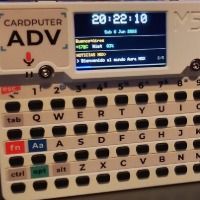
    Hi everyone! I want to share a project I've been working on: Aura MSX, a fully working MSX1 emulator for the M5Stack Cardputer. [image: 1782590415550-whatsapp-image-2026-06-06-at-9.06.59-pm.jpeg] What is Aura MSX? Aura is an MSX1 emulator written from scratch for the Cardputer. It runs real MSX software — games, BASIC programs, and tools — straight from the SD card, with a custom launcher to pick what to load. Under the hood: CPU: Z80 core by superzazu Video: TMS9918A VDP emulation Sound: AY-3-8910 PSG BIOS: C-BIOS (free and open-source — no proprietary firmware required) Custom launcher to browse ROMs and cassette images from the SD card Datasette module (this is my favorite part) Aura includes a working Kansas City Standard datasette emulator. It outputs FSK audio at 1200 baud through the Cardputer's headphone jack, so you can: Save BASIC programs from the emulator as real .cas files Load .cas files placed in the /cintas folder on the SD card Connect the headphone output to a real MSX and transfer programs to original hardware The timing was validated against cas2wav to make sure the audio is bit-accurate. [image: 1782590436976-703539445_10238837044962711_853978074363069083_n-resized.jpg] Hardware compatibility Aura runs on both the original Cardputer and the Cardputer-ADV from a single binary. On the ADV, it uses the TCA8418 keyboard and the ES8311 audio codec automatically. How to use it Flash the firmware to your Cardputer Prepare a FAT32 microSD card with: ROM files in the root or in a folder A /cintas folder for .cas cassette images Insert the card, power on, and the launcher takes over Documentation A full Spanish user manual is included, plus a printable trifold quick reference card. SD (FAT32) /msx/roms/ cartuchos .ROM /msx/disks/ programas .BAS /cintas/ cintas .CAS [image: 1782590948349-captura-de-pantalla-2026-06-27-170837.jpg] I'll be uploading it to M5Burner shortly so it's a single click to flash. I'll edit this post with the link once it's up. Feedback, bug reports, and suggestions are very welcome. Cheers, Altaris Software

  • This is the place to discuss driver issues, M5 burner troubleshooting, and development of software compatible with M5Stack

    3k Topics
    10k Posts
    robskiR
    @Boomvalt check below link... https://github.com/m5stack/esphome-yaml/tree/main/components/powerhub
  • 267 Topics
    583 Posts
    ?
    Приветствую! Прошу помочь с подключением Cardputera-ADV к UIFlow 2.0. Создал проект, но не получается загрузить его для проверки на устройство. В UIFlow справа внизу отображаются только две кнопки кнопки "Run Once" и "Run Always". WebTerminal выдаёт ошибку: NotFoundError: Failed to execute 'requestPort' on 'Serial' : No port selected by the user. P.S. Драйверы установил, через m5Burner установил на устройство UIFlow для ADV.