🤖Have you ever tried Chat.M5Stack.com before asking??😎
  • 0 Votes
    1 Posts
    4k Views
    No one has replied
  • Turn your M5Stack into a space clock

    5
    2 Votes
    5 Posts
    9k Views
    pavelprostoP
    if you want the same stand as in the photo. This is a free 3d printer model https://www.thingiverse.com/thing:4883660
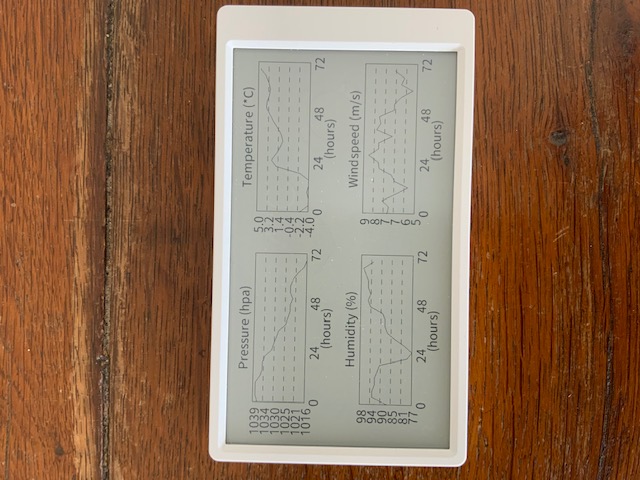
  • My OpenWeatherMap display wth M%Paper

    m5paper
    6
    3
    3 Votes
    6 Posts
    13k Views
    C
    @powersoft Hi, it is a very nice project! Maybe you can share your code with me?
  • CAS Graphics calculator implemented in Core2 with faces keyborad

    5
    2 Votes
    5 Posts
    8k Views
    ajb2k3A
    Very nice.
  • M5Stack product scan times (moved post to here!)

    1
    0 Votes
    1 Posts
    3k Views
    No one has replied
  • Library for Hex Module SK6812

    2
    1 Votes
    2 Posts
    4k Views
    teastainT
    @sebastien Nice to see other enthusiasts contribute to the knowledge base!
  • RF Unit 433 R (SYN513R) to sniff - 433Mhz traffic

    1
    0 Votes
    1 Posts
    3k Views
    No one has replied
  • WIP ACSSR Guide

    4
    1 Votes
    4 Posts
    5k Views
    felmueF
    Hello @ajb2k3 I've just checked. Above blocks work for me with an M5Core2 as well. Instead of TX=17 / RX=16 I use TX=14 / RX=13. That said I do not have the RS485 unit so I am using the little RS485 board (which came with the LAN module) albeit outside the LAN module connected via a BUS module. The ACSSR is powered from an external 12 V power supply. The little RS485 board is powered with 5 V from the M5Core2. There are only two wires between the ACSSR and the little RS485 board: A <-> A and B <-> B. I also added an 120 Ohm resistor between A and B of the little RS485 board. The ACSSR already has that resistor in place internally. Thanks Felix
  • M5Stack Core Basic LCD stop displaying properly after connecting to WiFi

    1
    0 Votes
    1 Posts
    2k Views
    No one has replied
  • M5Stack speaker not working

    12
    0 Votes
    12 Posts
    20k Views
    felmueF
    Hello guys The issue is a divide by zero, caused by the ledcSetup(TON_PIN_CHANNEL, 0, 13); function call found by @a4x4kiwi (thanks for that). I found that the outcome is different depending on the Arduino version used: Arduino 1.0.6 - no error, no crash Arduino 2.0.1 - no error, no crash Arduino 2.0.2 - crash Arduino 2.0.3 - error, no crash E (4532) ledc: freq_hz=0 duty_resolution=13 [ 4537][E][esp32-hal-ledc.c:75] ledcSetup(): ledc setup failed! Thanks Felix
  • HTTPS using LTE/4G on M5Stack Fire

    6
    0 Votes
    6 Posts
    8k Views
    felmueF
    Hello @jimmyb thank you for reporting back. I am glad you found a solution. And good luck with your project. Thanks Felix
  • looking for an example of graphical representation of sensor values

    2
    0 Votes
    2 Posts
    4k Views
    F
    https://shop.m5stack.com/pages/download choose M5Burner download The picture is a factory test example(Core2 factory test firmware)
  • I2CHomeAssistant Gateway

    4
    0 Votes
    4 Posts
    5k Views
    G
    Ok, will order the "new" version when its back in stock.
  • Extending ribbon cable on camera module Timer Cam x

    3
    0 Votes
    3 Posts
    5k Views
    M
    Hi, there We appreciate your feedback! we haven't tested it yet and we will share this with our team:)
  • M5stack core 2 TCPIP connection example

    4
    1
    0 Votes
    4 Posts
    6k Views
    felmueF
    Hello @moonbouncer not that I am aware of, no. I don't see any general TCP blocks in UiFlow. You probably would need to use MicroPython directly. Thanks Felix
  • M5STAMP C3 ANALOG INPUT

    3
    3
    0 Votes
    3 Posts
    5k Views
    Z
    thanks br
  • M5Stack MultiApp Advanced Firmware

    51
    3 Votes
    51 Posts
    359k Views
    B
    Hello, I realize this topic is very old but I'm trying to compile the MultiApp Advanced firmware. I'm getting several compile issues: src/Apps/WiFiWps/WpsConnect.cpp:30:12: error: 'struct esp_wps_config_t' has no member named 'crypto_funcs' src/Apps/WiFiWps/WpsConnect.cpp:30:28: error: 'g_wifi_default_wps_crypto_funcs' was not declared in this scope src/Apps/WiFiWps/WpsConnect.cpp:90:27: error: no matching function for call to 'onEvent(void (&)(arduino_event_id_t, system_event_info_t))' src/Apps/WiFiWps/WpsConnect.cpp:90:18: error: invalid conversion from 'void ()(arduino_event_id_t, system_event_info_t)' to 'WiFiEventSysCb' {aka 'void ()(arduino_event_t*)'} [-fpermissive] *** [.pio\build\esp-wrover-kit\src\Apps\WiFiWps\WpsConnect.cpp.o] Error 1 lib/ESP32Audio/src/AudioOutputI2S.cpp:190:10: error: 'i2s_write_bytes' was not declared in this scope *** [.pio\build\esp-wrover-kit\lib803\ESP32Audio\AudioOutputI2S.cpp.o] Error 1 I did clone the git repo today, so everything should be up to date. Looks like I'm missing some library? Thanks, Brian
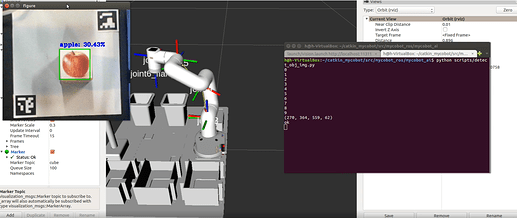
  • Image recognition and object grabbing with robotic arms

    3
    3
    1 Votes
    3 Posts
    5k Views
    ElephantRoboticsE
    We use M5stack basic as our main controller, we can connect any camera. It only needs to adapt to the camera of StickV or UnitV to complete the recognition.
  • Call for articles with your product on M5Stack!!

    5
    1 Votes
    5 Posts
    19k Views
    BramB
    @salty_good My name is Abraham Stolk, I am an indie game-developer from Vancouver, Canada, who turned electronics-maker. My latest product is the Desk-side Stock Ticker. It is a tiled-panel of 4 OLED displays that are used to scroll stock quotes on. [image: FQKNz5zVgAQFFqn?format=jpg&name=large] By default, it will scroll the stock quotes from the DOW-30 Index. But you can configure the symbols to use, over wifi. The stock quotes are downloaded from the Internet, with a 3 minute refresh. To connect it to your WiFi network, you use the WPS button of your home router. It was really easy to get going, thanks to the WPS example in the Arduino IDE. I programmed it in C, using Arduino IDE. It runs on either Stamp-C3 or Stamp-C3U. I love the white-look of the Stamp-C3U: it is the best looking μcontroller in existence, I think. Although the black Stamp-C3 is a little easier to program, as you do not have to force it in bootloader mode the first time you use it. Overall, I am a big fan of your μcontroller boards. [image: 2022-04-12T17%3A02%3A48.372Z-ticker5..jpeg?1649757785] The production process was prototyping on a breadboard to validate the design. Once it worked, I designed a PCB in EasyEDA, and had JLCPCB manufacture the PCBs. Assembly was done in my home-lab. I am particularly proud of how I managed to take cheap 1.3" OLEDs and tile them into a 140mm aggregate screen. Thanks to the fast SPI interfacing, I get high FPS out of it.

  • M5 CORE INK

    m5 core ink
    2
    0 Votes
    2 Posts
    3k Views
    felmueF
    Hello @BM22 have a look at this example. It shows how to put 'Hello World!' onto the M5CoreInk screen. Thanks Felix