@felmue Thanks again! It's now placed in my shopping basket :-)
M
Offline
Posts
-
RE: How to connect three Unit Reflective IR via Unit PaHUB V2 in UIFlow2?
-
How to connect three Unit Reflective IR via Unit PaHUB V2 in UIFlow2?
I would like to build a line follow robot and read the analog values of three sensors. How can I connect three Unit Reflective IR via Unit PaHUB V2 to my AtomS3 Lite? It seems in the UIFlow2 GUI I can only add a single Unit Reflective IR. And it needs some custom pin input?
-
Issues building a driving robot with atomic motion base, ToF sensor and 360 servos
I want to build a driving robot with Atomic Motion Base and 2x 360 servos.
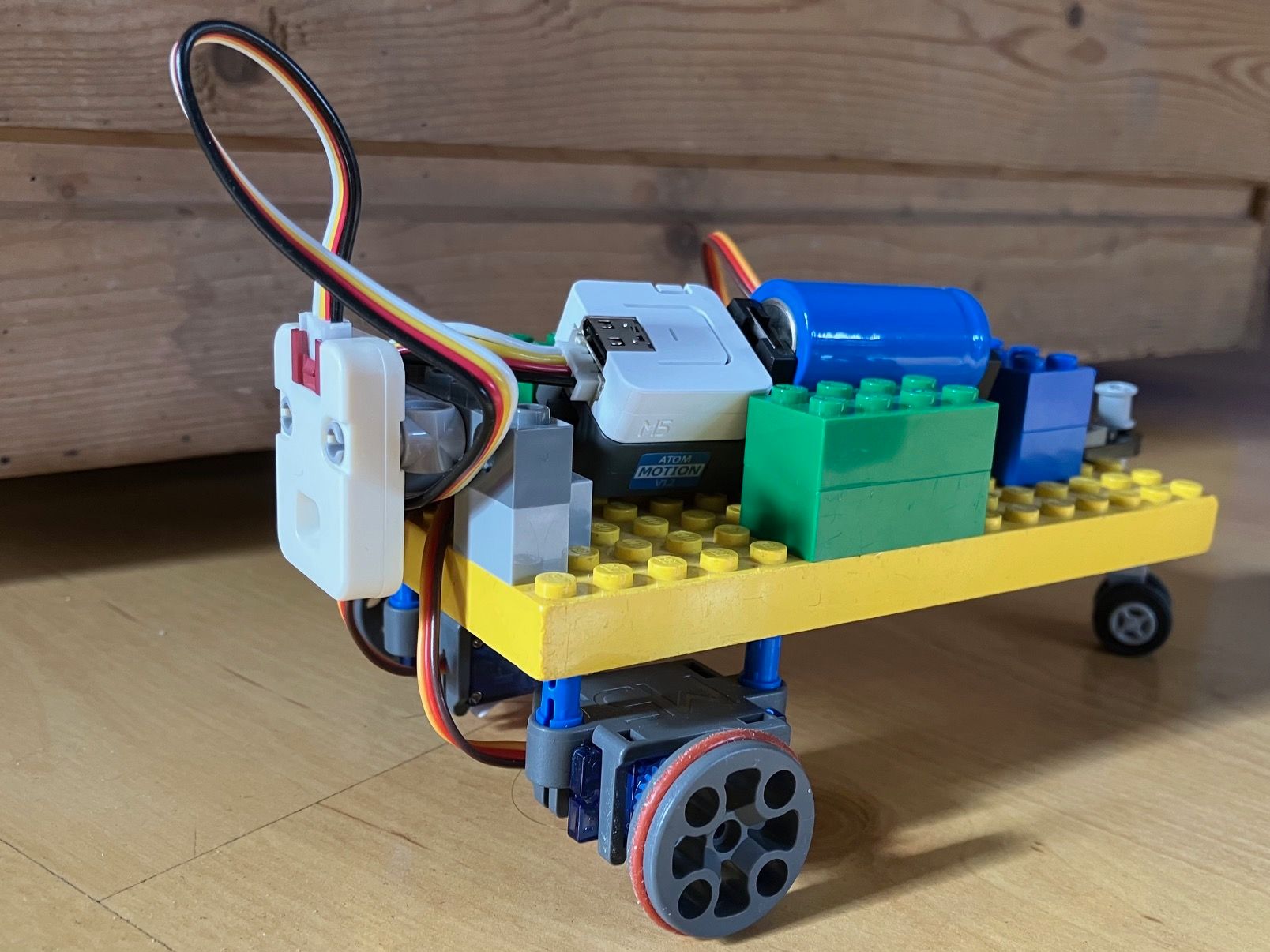
I started with Atom Matrix. After motion base and ToF4M have been added in UIFlow2, it always tells me that I2C is not correctly initialized. I tried chat, it didn't help. Maybe it's an error with the UIFlow defaults for the combination?
Next was AtomS3 Lite, there UIFlow2 just continued to work after adding motion base and ToF4M.
During boot of Atom Matrix and AtomS3 Lite on USB, I often saw an error about "Wrong Password" in the log. It seems the WiFi is connecting, but it's not waiting long enough before trying cloud login. But that's just a guess. Sometimes it works, so a lot of reboots to get to stable state.
Next was the servo setup, two 360 servos connected to the motion base. It took some time to figure it out. Angle at 90 means stop, pulse at 1500 means stop. I would have expected that the same value means the same speed, but with pulse 1300 and 1700 it was always not going straight. I would have expected that servos can handle this better.
Finally the ToF4M was added to the code, to turn before getting to close to an object. Sometimes it works, sometimes it doesn't, I am not sure what the issue is, maybe the sensor needs more stable power than the 18350 battery can supply.
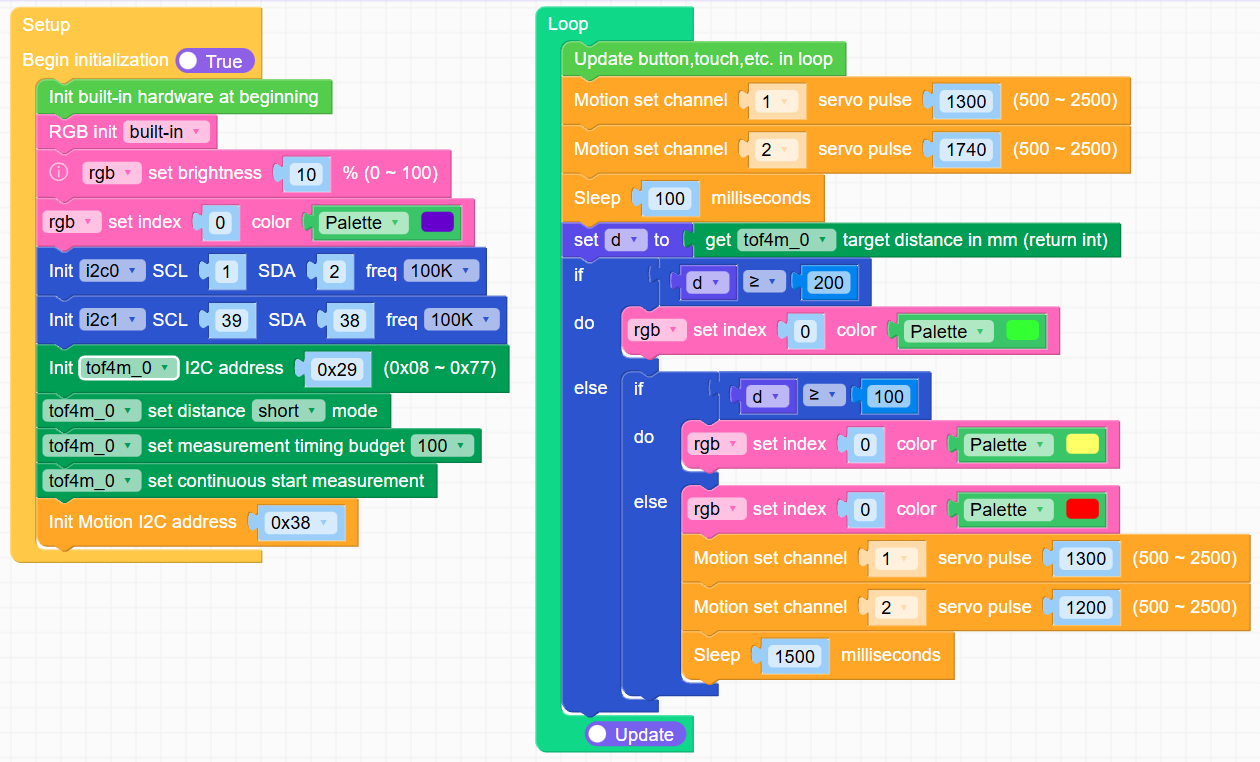
Overall it was a unpleasent experience. Atom challanges, servos not going reliably straight, ToF not always working, it was a bit disappointing. Happy to get any kind of constructive feedback, how to improve the situation.
-
Different reset behaviour of Atom Matrix and Atom S3 Lite?
Why do those two Atom devices behave differently when being reset?
When I reset the Atom Matrix, the USB serial connection is kept, I see the full console output.
When I reset the Atom S3 Lite, the USB serial connection is always terminated and I need to re-connect, missing parts of the console output.
-
RE: "Set timezone" block does not work in v2.1.8 on Core2
The block "get timezone (return string)" is also not working, showing traceback.
-
NTP time does not work in v2.1.8 on Core2
When getting the time in UIFlow2, date tuple has the year 2054 and the minutes are 17 off, so it's seems not to be a timezone issue.
I tried multiple NTP servers when flashing, like the pre-configured ntp.aliyun.com and also de.pool.ntp.org. The device is connected to Internet, I can run my program via UIFlow2 cloud, but the time is not synchronized correctly.
It would be great to be able to manually trigger the NTP sync of time.
-
"Set timezone" block does not work in v2.1.8 on Core2
"Set timezone" block does not work, neither with the dropdown nor with the string, in v2.1.8 on Core2.
Both blocks are converted into the same python code:
import time
time.timezone('GMT+1')
Traceback:
AttributeError: 'module' object has no attribute 'timezone' -
RE: M5Burner UIFlow2 Config should be saved for re-use
@ajb2k3 Using M5Burner v3.0.0 on MacOS v14.7 on MacBook M3.
-
"Traceback" on Core2 with UIFlow v2.1.8, when running fresh project
Using a Core2 with fresh v2.1.8-CORE2 image flashed and UIFlow2 V2.1.8 in web, connected via cloud.
Every time I run a brand new project file (just Setup and Loop), this is shortly shown on device, before the program runs:
Traceback (most recent call last): File "<stdin>", line 27, in <modules> Keyboardinterrupt: -
M5Burner UIFlow2 Config should be saved for re-use
Every time I flash an image with M5Burner, I have to change again
COM,BaudRate,SNTP0,SNTP1andTimezone.It would be great if M5Burner could save all the config items for next time re-use.
It seems
WIFI SSIDandWIFI Passwordare already saved. -
Create Software / M5Burner sub-category
It would be great to have a dedicated sub-category for the M5Burner software.
-
When to expect programmatic graphics functions, like point, line, rect, circle and framebuffer?
I would like to create a clock face on the Core2 screen, with hour, minute and second hands. It seems this is currently not possible?
When I want to draw 60 second dots, I would rather use a math function and draw them programatically, than create 60 UI elements.
Especially when using multiple screens, I don't want everything overlayed in the UI editor .
-
How to remove Labels and Touch Buttons?
I create a GUI with Labels and Touch Buttons, then I want to clear the screen and draw a clock. But even though I hide the elements and delete them, they are still shown as white outline.
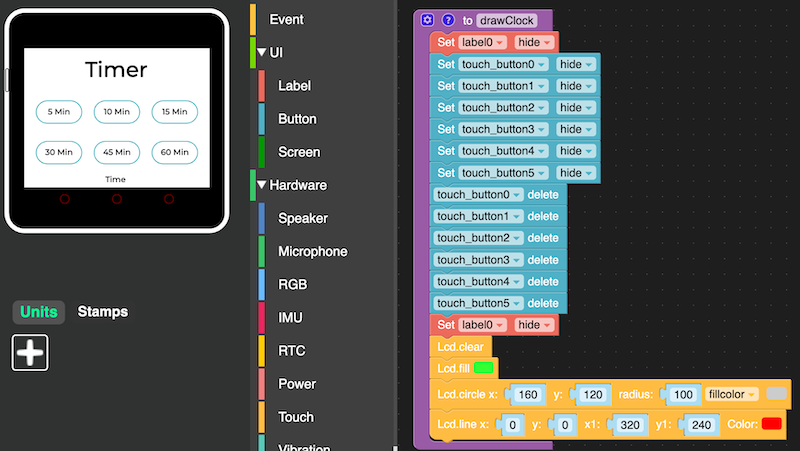
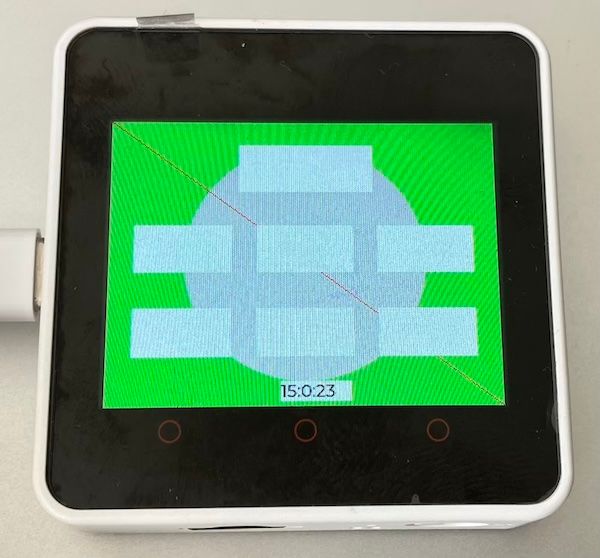
How to fully hide GUI designer elements to have a blank screen to draw onto?
-
RE: UIFlow web IDE error after using timer: "Upload code failed"
@kuriko Wow, this is cool! Core2 UIFlow v1 is in WiFi mode, but with "Terminal (Beta)" I can connect over the USB serial console. The play button will upload and run the current script, even with timers.
Would be very cool if the whole UIFlow web IDE had a setting to just connect via cable. Or if the Terminal play button could be placed somewhere in the IDE, without having the terminal window open all the time.
Side note: The regular UIFlow web IDE play button now shows a green success message "Execute code successfully" when clicked, but the code is actually not running on the device. Either it's not uploaded or not restarted.
-
RE: UIFlow web IDE error after using timer: "Upload code failed"
@kuriko So I have downgraded to UIFlow v1 firmware on the Core2 again. I started the UIFlow web IDE in Chrome, expected it to have some web serial support (like CircuitPython has a web flasher), but I can not find any settings for USB or serial.
The download page (link) states "Desktop IDE MacOS (update is terminated)", so do I need to run "UIFlow Local Server for MacOS"? The regular UIFlow web IDE only supports WiFi connection?
The local m5burner software worked without a problem with USB
/tty.usbserial. -
RE: UIFlow web IDE error after using timer: "Upload code failed"
@robski Found and added RTC and Timer. In UIFlow v2 the WiFi connection still works when using the timer and updating a label every second. I can still update and run code.
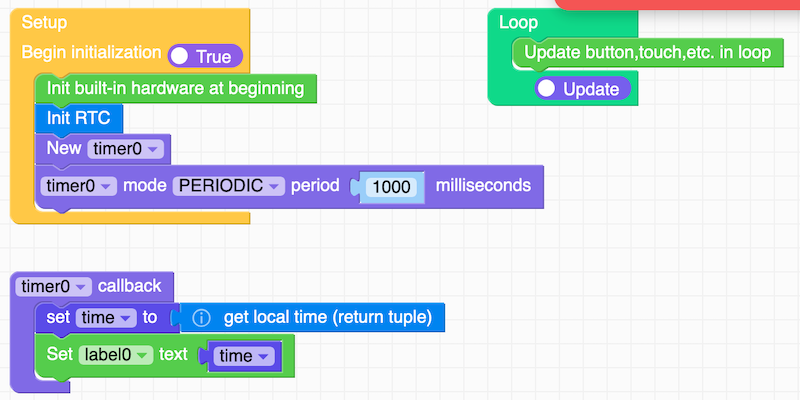
I started with M5Stack hardware in 2020 and I am a bit surprised that some functions are still not there in 2024 in UIFlow:
-
It seems UIFlow2 lost the "Touch Button" in the GUI designer using rounded rectangle with text and on_touch event.
-
It seems there is no way to design multiple screens or views. It's great to have a graphical GUI designer, but how can you only have one single view and not be able to switch between multiple in designer and via code?
-
It seems there are no graphics functions in UIFlow v2. I want to programmatically draw an analogue clock (circle, 12x dashes, 3x hands), that seems not possible anymore.
-
When using graphics functions, it would be great to be able to draw on screen or on a virtual screen, then updating the real screen as a whole.
Should I create separate "feature requests" for those things?
-
-
RE: UIFlow web IDE error after using timer: "Upload code failed"
@robski The device is still connected when I run a "regular" program. It seems still to be connected when running a program with timer or
while true: sleep(1), but as soon as I press "Run", theConnectedturns intoDisconnected.@kuriko Wanted to try serial, but pressed the "Download" button to save the file. Instead it uploaded the program to the device. Funnily it said first "Upload failed", on second try it was successful. So the naming convention (meaning) seems to be different, even within UIFlow ;-) I would have expected for "Download" to save the file to computer, and rather have something like "Upload" to save it as main program on device. MAybe I try this later
@robski Upgraded to UIFlow 2, was surprised to need to register and bind the device. Can't find a button element, cant find a timer, neither software nor hardware.
@ajb2k3 I am aware to be able to reset the device to re-run, but that's not the point. I can edit end re-run a program via WiFi many times. Just the use of timer or
while true: sleep(1)seems to disable the Wifi connection or the internal software to receive updates from UIFlow web IDE.Will continue to investigate in an hour or so.
-
UIFlow web IDE error after using timer: "Upload code failed"
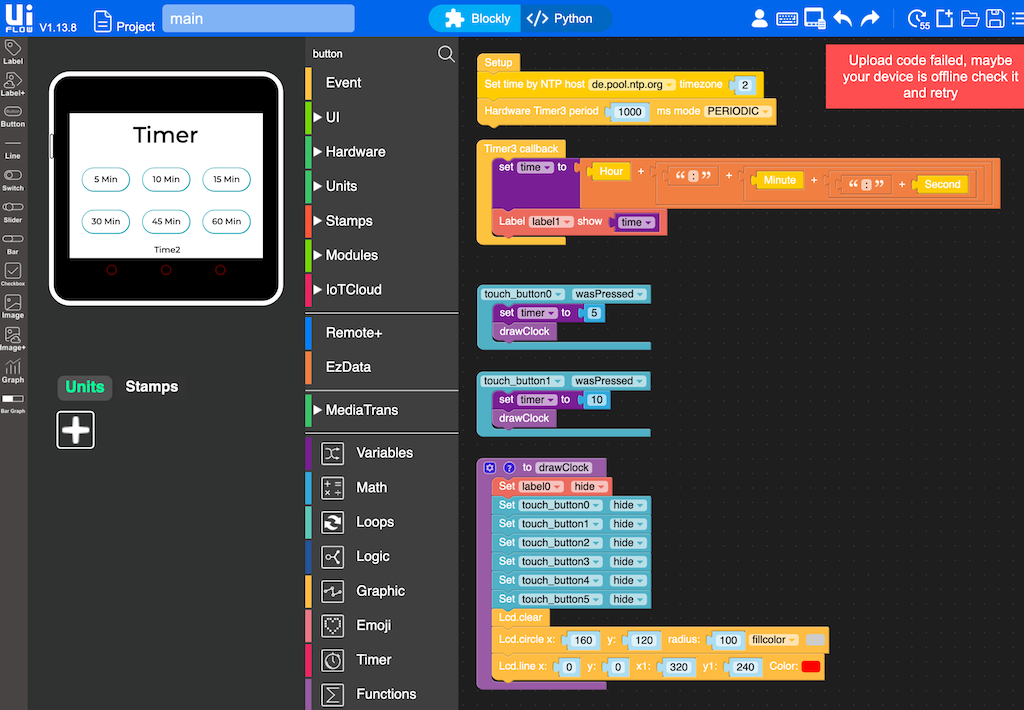
I am trying to use a timer in UIFlow to show the current time. When using "Run" in UIFlow web IDE, it will upload and run the program on Core2 once.
But every time I try to "Run" again, when the program is already running, I get an error in UIFlow web IDE: "Upload code failed, maybe your device is offline check it and retry"
I tried with both the hardware timer and the software timer. I also tried a loop with "Wait 1s". But every time I do this, the UIFlow web IDE can't upload anymore, it worked perfectly before.
What should I change in my code to have the device work with UIFlow web IDE and use a timer to update UI every second?
-
RE: UIFlow Display Pages, Settings page, alternate layouts
+1 for something like pages / screens / views
Just getting back into M5Stack hardware, got an idea I want to implement, created the first screen with some select buttons, then got stuck as I found no way to create multiple views and switch between them.
Tried to clear the screen, and draw something, but the buttons are still visible as white rectangles, even when set to hidden.
-
RE: [MicroPython] Add urllib.parse to base firmware to enable web services
Adding
upipto the firmware image would make developer's live much easier.How to manually install the
urllib.parselibrary.Create folder
/upipand add files upip.py and upip_utarfile.py manually.Install the library with upip:
%cd /flash/upip
import upip
upip.install("micropython-urllib.parse", "/flash/lib")
To get it working, remove
re.pyandffilib.pyfromlib. Hat-tip to Andreas.Finally you can encode URL parameters for GET requests:
%cd /flash/lib
import urllib.parse
urllib.parse.urlencode({"a":1, "b": 2})

=> 'a=1&b=2'