🤖Have you ever tried Chat.M5Stack.com before asking??😎
  • Does the Env Hat cover the IR and LED?

    7
    0 Votes
    7 Posts
    14k Views
    P
    @wikistik Great pictures, thank you!
  • [Solved] Cannot flash UIFlow 1.3.2 on M5StickC

    5
    0 Votes
    5 Posts
    13k Views
    m5stackM
    Congrats, good to know
  • Burn Ui Flow Firmware

    2
    0 Votes
    2 Posts
    4k Views
    m5stackM
    if you tried with 115200, and no success, that would be necessary.
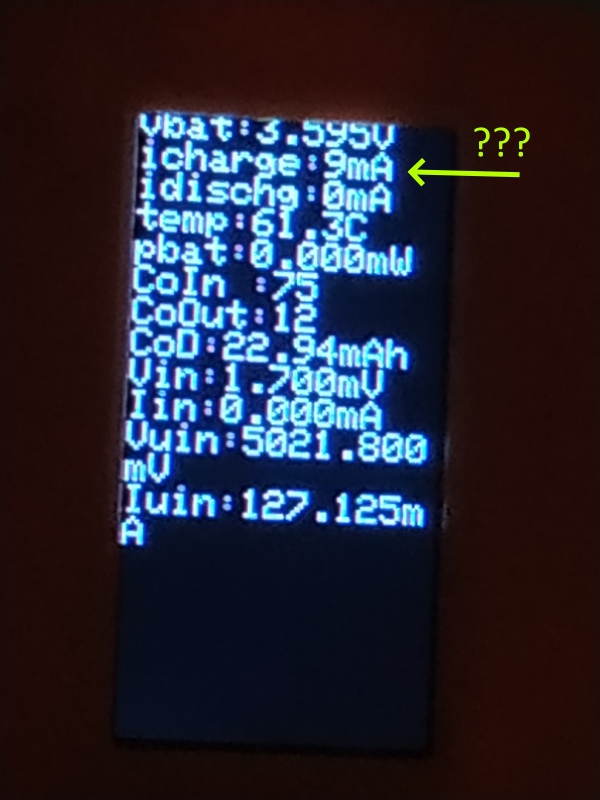
  • Unreal power discharge / charge current

    6
    2
    0 Votes
    6 Posts
    14k Views
    ajb2k3A
    @hague said in Unreal power discharge / charge current: I made some tests: The discharge current depends on the Screen Brightness: idischg: 42mA @ ScreenBreath(7) idischg: 44mA @ ScreenBreath(8) idischg: 51mA @ ScreenBreath(9) idischg: 58mA @ ScreenBreath(10) idischg: 65mA @ ScreenBreath(11) idischg: 75mA @ ScreenBreath(12) idischg: 90mA @ ScreenBreath(13) idischg: 105mA @ ScreenBreath(14) idischg: 116mA @ ScreenBreath(15) The charge current depends on the temperature: icharge: 86mA @ 31°C icharge: 86mA @ 44°C icharge: 8mA @ 46°C icharge: 8mA @ 48°C icharge: 8mA @ 52°C A bright screen is heating up the Stick quite fast. Hope that helps... is that 86mA or 8.6mA as thats quite a jump? BTW thanks for taking the time to do all this testing.
  • M5StickC hardware accessory notes

    2
    1 Votes
    2 Posts
    6k Views
    ajb2k3A
    @wikistik said in M5StickC hardware accessory notes: I will be using the "stick" in teaching environments over the next year so I have started compiling notes on how well it works with various hardware add-ons. At the moment I have a starter list posted at: http://tinkerfarm.net/projects/the-m5stickc/m5stickc-hardware-accessories/. I will be adding to that page as I get deeper into it, next up will be some of the commodity sensors that people use with Arduinos, since my site is aimed at beginners. I hope this might be helpful to some of the people on this forum. Nice work. I have the first three hats and waiting on the next set of hats but not had time to test them. I have been able to UIFlow to work with the temp/pressure and humidity part of the env sensor but I have had to put on hold testing will I go back to writing up and test all my old stuff first. You can see my work in progress nots for UIFlow in the project forum.
  • [solved] M5StickC : Issues with Software Serial

    1
    0 Votes
    1 Posts
    5k Views
    No one has replied
  • Battery level

    7
    0 Votes
    7 Posts
    15k Views
    ajb2k3A
    @cepics said in Battery level: does it should work on GRAY M5Stick too ? tnks I don't think so but i could be mistaken.
  • This topic is deleted!

    1
    0 Votes
    1 Posts
    2 Views
    No one has replied
  • DS18B20 @ Grove Connector

    7
    0 Votes
    7 Posts
    18k Views
    ajb2k3A
    @grelm I think (but i could be wrong) 10mA should be ok.
  • This topic is deleted!

    1
    0 Votes
    1 Posts
    5 Views
    No one has replied
  • How to restore display after M5.Axp.SetSleep() with code?

    4
    0 Votes
    4 Posts
    10k Views
    V
    @ricardocosta void AXP192::SetSleep(void){ Wire1.beginTransmission(0x34); Wire1.write(0x31); Wire1.endTransmission(); Wire1.requestFrom(0x34, 1); uint8_t buf = Wire1.read(); buf = (1<<3)|buf; Wire1.beginTransmission(0x34); Wire1.write(0x31); Wire1.write(buf); Wire1.endTransmission(); Wire1.beginTransmission(0x34); Wire1.write(0x12); Wire1.write(0x41); Wire1.endTransmission(); }
  • M5Stick (non C) USB mode

    3
    0 Votes
    3 Posts
    7k Views
    I
    Hi Just trying to upload script to stick via usb (IDE). Either on mac or windows I can see stick usbslabtouart for erasing and firmware burn but it is not available to Ui Flow IDE to download the script. Core and Stick C work both well with Ui Flow IDE since they have usb option in their menu. No luck so far with Stick non-C
  • Infrared in receive mode: is it possible?

    3
    0 Votes
    3 Posts
    6k Views
    R
    @ajb2k3 Thanks!
  • Knock Detector with microphone m5stickC

    7
    0 Votes
    7 Posts
    18k Views
    world101W
    @auct said in Knock Detector with microphone m5stickC: @world101 said in Knock Detector with microphone m5stickC: @auct Try this... https://github.com/m5stack/M5StickC/blob/master/examples/Basics/Micophone/Micophone.ino Thank you, I saw it. How to write it in Python? Sorry about that. I didn’t see that you were looking for a Python example. After a bit more digging, I noticed the M5Go default program has a Preview Microphone function. Check our lines 154-194 from here: https://github.com/m5stack/M5GO/blob/master/M5GO.py
  • uiflow firmware issues with stickC

    4
    0 Votes
    4 Posts
    8k Views
    m5-docsM
    [image: 1557052620919-%E5%BE%AE%E4%BF%A1%E6%88%AA%E5%9B%BE_20190505183628.png]
  • [Solved]M5stick-C connected but not reachable from UIflow

    9
    0 Votes
    9 Posts
    18k Views
    ajb2k3A
    @arzaman said in M5stick-C connected but not reachable from UIflow: Also mine now up and running ! thanks to M5 stack support hope it will remain stable point closed Davide [image: 1556959603100-57067176-fe44-471d-8d30-f16d7cec8bf9-image.png] The problem is down to the server host, every so often the server has a fit and brakes things.
  • [Solved]M5StickC firmware

    16
    0 Votes
    16 Posts
    38k Views
    ajb2k3A
    @arzaman Just upload an arduino program in the normal way. It will overwrite the UIFlow bootloader and you can continue to use the devices.
  • [Solved]M5Stick and VL53L1X

    9
    0 Votes
    9 Posts
    18k Views
    ajb2k3A
    @cepics said in [Solved]M5Stick and VL53L1X: /* This example shows how to take simple range measurements with the VL53L1X. The range readings are in units of mm. */ #include <Wire.h> #include <VL53L1X.h> VL53L1X sensor; void setup() { Serial.begin(115200); //Wire.begin(); Wire.begin(25, 13); // (SDA, SCL) grove stick //Wire.begin(21, 22); // (SDA, SCL) grove stack Wire.setClock(400000); // use 400 kHz I2C sensor.setTimeout(500); if (!sensor.init()) { Serial.println("Failed to detect and initialize sensor!"); while (1); } // Use long distance mode and allow up to 50000 us (50 ms) for a measurement. // You can change these settings to adjust the performance of the sensor, but // the minimum timing budget is 20 ms for short distance mode and 33 ms for // medium and long distance modes. See the VL53L1X datasheet for more // information on range and timing limits. sensor.setDistanceMode(VL53L1X::Long); sensor.setMeasurementTimingBudget(50000); // Start continuous readings at a rate of one measurement every 50 ms (the // inter-measurement period). This period should be at least as long as the // timing budget. sensor.startContinuous(50); } void loop() { //Serial.print(sensor.read()); //MM Serial.print(sensor.read()/10); //CM if (sensor.timeoutOccurred()) { Serial.print(" TIMEOUT"); } Serial.println(); } it works!!! Glad it works and sorry for posting the pins the wrong way around.
  • M5Stick FRIED

    Moved
    10
    0 Votes
    10 Posts
    13k Views
    ajb2k3A
    @watson said in M5Stick FRIED: @ajb2k3 Looks like Voltage regulator chip - 5v to 3.3v Triode is smaller than it. Thanks @watson
  • logic level

    2
    0 Votes
    2 Posts
    4k Views
    m5-docsM
    @smrtokvitek just use some 3V3 regulator to step down the voltage from M5Stick and connect data lines directly. As you said, the data pins all connect directly to esp32.