AtomDTU NB-IoT
-
thanks
The return is
b'AT\r\r\nOK\r\n' -
Hello @Felix22
ok, his means your modem is alive and responding.
Now, please try the following commands (which are the same as are used in
Init NB-IoT DTU) block, but we can see the responses of the modem: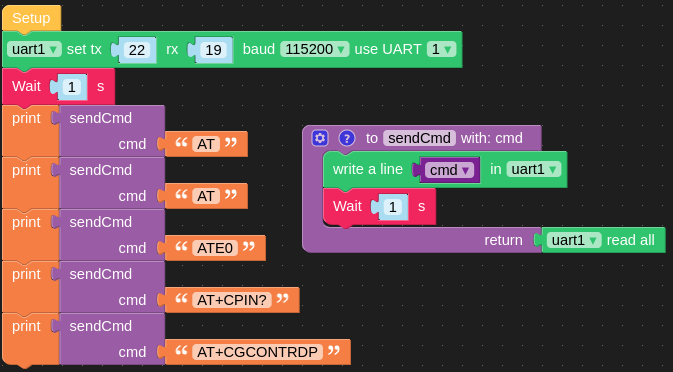
You should get something like:
b'\r\nOK\r\n'
b'\r\nOK\r\n'
b'\r\nOK\r\n'
b'\r\n+CPIN: READY\r\n\r\nOK\r\n'
b'\r\n+CGCONTRDP: 1,5,"<YourAPN>","10.100.100.100.255.255.255.0"\r\n\r\nOK\r\n'
Thanks
Felix -
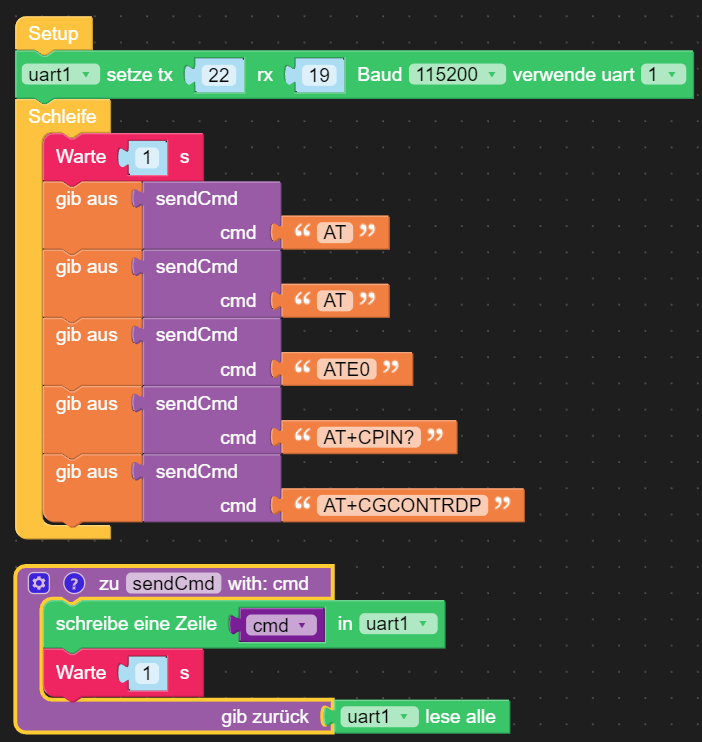

Yesterday i have made the similar with Arduino-C-Code and become as Response the carrier Code 28801 = Swisscom-Network but no response in q.beyond-Control-Panel...
I have tested with a complete new AtomDTU. Flash with v1.13.2
I think, no response :-((
-
Hello @Felix22
I just read in the q.beyond FAQ says that the SIM card needs to be activated.

I assume you did that already?
Thanks
Felix -
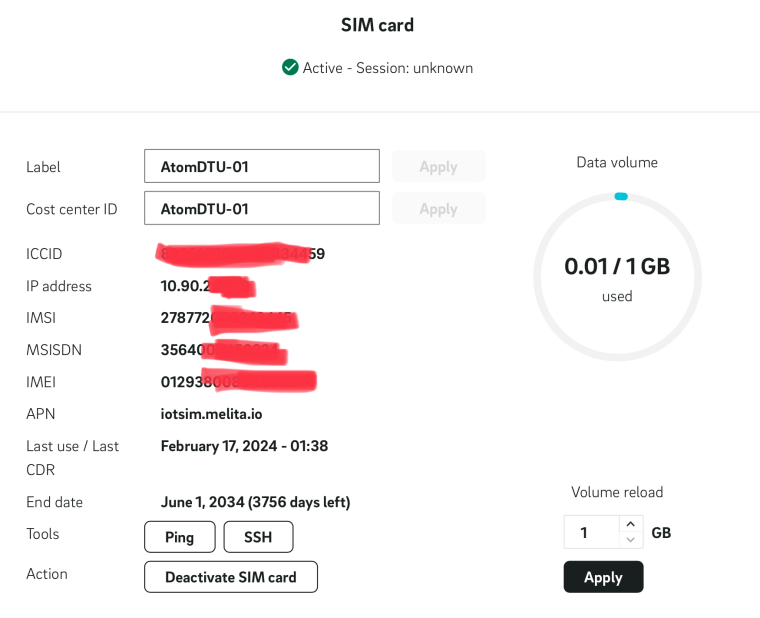
Yes, I have do it. She is activated.
The connection from 17.2.24 comes from a old iPhone -
Hello @Felix22
ok, let's see what providers your modem can see.
Note: the last AT command
AT+COPS=?can take a couple of minutes as it has to scan through all bands. (in my case it took about 3 minutes.)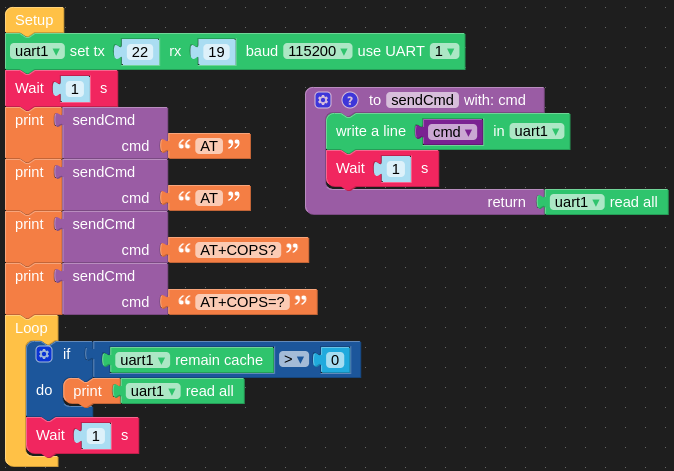
Expected output:
b'\r\nOK\r\n'
b'\r\nOK\r\n'
b'\r\n+COPS: 0,2,"22801",9\r\n\r\nOK\r\n'
None
b'\r\n+COPS: (1,"SWISS GSM","SWISS","22801",9),(1,"sunrise","sunrise","22802",9),,(0-4),(0-2)\r\n\r\nOK\r\n'
Thanks
Felix -

:-)
-
Hello @Felix22
ok, so it seem that the modem is registered with Swisscom, but doesn't get an IP address since
AT+COPS?succeeds, butAT+CGCONTRDPfails.At this point I am not sure what might be the issue. Is there anything in the q.beyond portal, like a log showing some error?
Also since you used your iPhone with that SIM card before there might be some kind of security check not accepting a connection from a different device. On the q.beyond portal, is there a way to reset / clear the data from the previous connection?
Thanks
Felix -
Interesting, this is the response from the DigitalRepublic-SIM-Card how has no NarrowBand.
He see the Network also...

Now, ih have deactivated and new activated the SIM.

Now its a "3" = "Operator forbidden" (?) (Swisscom)
and
1 for sunrise -
Hello @Felix22
hmm, strange. Do you know which roaming partner (Swisscom and/or Sunrise) q.beyond has in Switzerland for NB-IoT? Maybe worth checking with q.beyond support.
Thanks
Felix -
Many thanks.
I will write to the support from q.beyond.
If the connection will go on. What are the Code for an MQTT connection ?
If i become an IP-Address, can i use the "normal" MQTT Blockly ??Regards,
Felix -
Hello @Felix22
please refer to the SIM7020 documentation for MQTT commands. You can find the PDFs here - section Related Link.
As soon as the modem gets an IP address the last AT command
AT+CGCONTRDPsent byInit NB-IoT DTUblock should succeed and then you can use all the other MQTT blocks.Thanks
Felix -
a.beyond say, she works in Switzerland with Swisscom NB.
How can I explicit connect to Swisscom (AT-Command) ? -
-
b'AT+CSQ\r\r\n+CSQ: 18,0\r\n\r\nOK\r\n'
men, i have a signal ?b'AT+CSTT="iotsim.melita.io","",""\r\r\nOK\r\n'
b'AT+CSTT?\r\r\n+CSTT: "iotsim.melita.io","",""\r\n\r\nOK\r\n'
APN is set correct ?b'AT+CGREG?\r\r\n+CGREG: 0,5\r\n\r\nOK\r\n'
Registered ?b'AT+COPS: 1,2,"22801"\r\r\nERROR\r\n'
b'AT+COPS?\r\r\n+COPS: 0,2,"22801",9\r\n\r\nOK\r\n'b'AT+CGACT?\r\r\n+CGACT: 1,0\r\n\r\nOK\r\n'
If i have a connection, do i become an ip-address ?
with the command AT+CIFSR -
Hello @Felix22
it is my understanding that
AT+CIFSRreturns the local IP address in a TCP or UDP connection. (It's an AT command for compatibility with SIM800.)See PDF document SIM7020 Series_TCPIP_Application Note_V1.04 - 6.2 TCP Client Connection. You'll find the link to the PDF here.
The way I use to set the APN is described in the same TCP/IP PDF - 3.2 APN Manual Configuration.
Thanks
Felix -
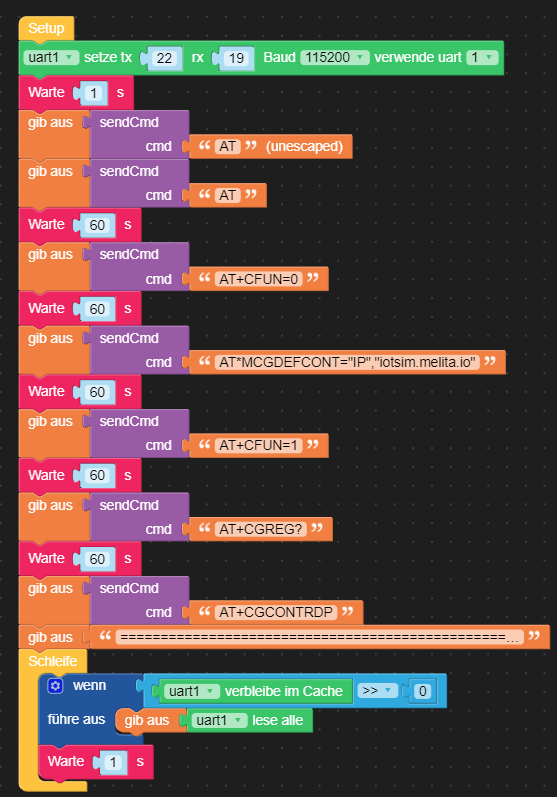
Result:
b'\r\nOK\r\n'
b'\r\nOK\r\n'
b'\r\nOK\r\n'
b'\r\nOK\r\n'
b'\r\nOK\r\n\r\n+CPIN: READY\r\n'
b'\r\n+CGREG: 0,5\r\n\r\nOK\r\n'
b'\r\n+CGCONTRDP: 1,5,"iotsim.melita.io","10.xx.xx.xx.255.255.255.0",,"212.xx.xx.xx","212.xx.xx.xx",,,,,1500\r\n\r\nOK\r\n'Im a big step wider... now, i have become my ip address... :-)
Now i think... MQTT, next step. -
-
-
now, i have a new problem.
The mqtt broker test.mosquitto.test is working with my Blockly but my own Broker on my Server at home in a Docker container is not available from AtomDTU. But with a Internet Test Tool, it is working ( https://testclient-cloud.mqtt.cool/ )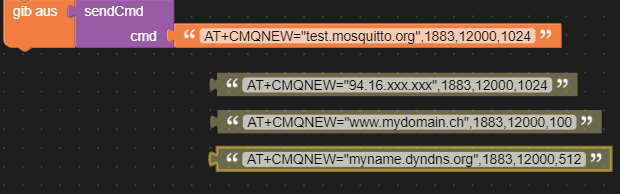
I see no difference...
The orange part is working and the tree other is not working- Domainname
- IP-Address
- Dyndns
not working...
test.mosquitto.org is working fine.

Hello! It looks like you're interested in this conversation, but you don't have an account yet.
Getting fed up of having to scroll through the same posts each visit? When you register for an account, you'll always come back to exactly where you were before, and choose to be notified of new replies (either via email, or push notification). You'll also be able to save bookmarks and upvote posts to show your appreciation to other community members.
With your input, this post could be even better 💗
Register Login