Core2 with 4IN8OUT module in Arduino IDE
-
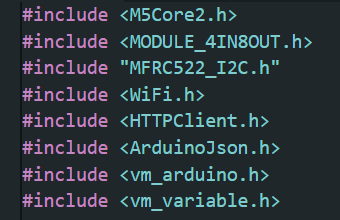
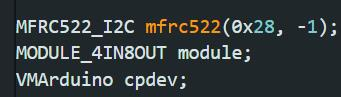
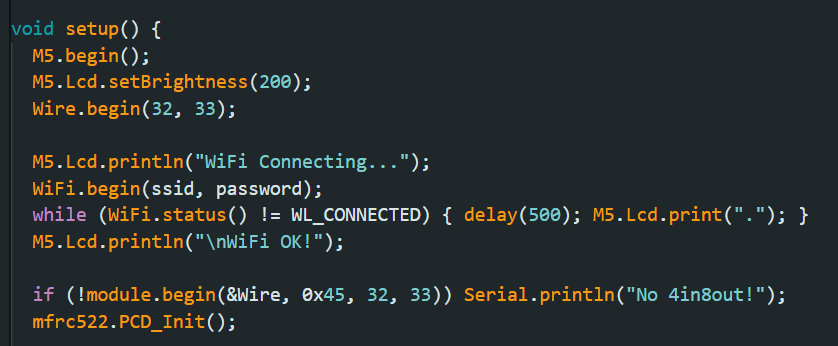
Hi! I've been trying to use this combination in my project, it worked fine in UIFow2 but I can't seem to get the 4in8out module working within Arduino IDE. I have ws1850s rfid module connected via A.I2C and that works fine so I'm not sure what's wrong..
-
To anyone trying something similar in the future
MODULE_4IN8OUT module;
MFRC522_I2C mfrc522(0x28, -1, &Wire);
void setup() { M5.begin(true, true, true, true); Serial.begin(115200); delay(500); Serial.println("Starting setup..."); M5.Lcd.println("Init..."); // POWER MANAGEMENT dla Port A (RFID) M5.Axp.SetBusPowerMode(0); M5.Axp.SetLDOEnable(2, true); delay(200); // --- I2C BUSES --- Wire.begin(32, 33, 100000); Wire1.begin(21, 22, 100000); delay(100); M5.Lcd.println("Init 4IN8OUT..."); // Start module 4IN8OUT if (!module.begin(&Wire1, 21, 22, MODULE_4IN8OUT_ADDR)) { M5.Lcd.setTextColor(RED); M5.Lcd.println("4IN8OUT INIT FAIL"); Serial.println("4IN8OUT INIT FAIL"); while (1) delay(1000); } M5.Lcd.setTextColor(GREEN); M5.Lcd.println("4IN8OUT OK!"); Serial.println("4IN8OUT OK!"); M5.Lcd.setTextColor(WHITE); // Init RFID mfrc522.PCD_Init(); M5.Lcd.println("RFID OK!"); Serial.println("RFID OK!");
Hello! It looks like you're interested in this conversation, but you don't have an account yet.
Getting fed up of having to scroll through the same posts each visit? When you register for an account, you'll always come back to exactly where you were before, and choose to be notified of new replies (either via email, or push notification). You'll also be able to save bookmarks and upvote posts to show your appreciation to other community members.
With your input, this post could be even better 💗
Register Login