Flow 2 Execute block
-
Hello I was wondering if flow 2 had "Execute block" and if not is there a timline or is this feature going to be added. I would like to be able to use both the block system and custom code.
-
A block to execute custom code?
I use the Execute code block under System in UIFlow2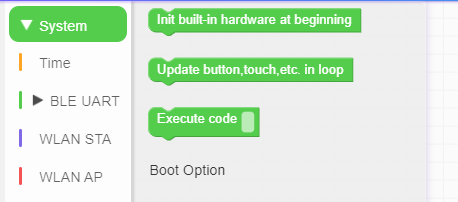
I'm a relative newbie so excuse me if that's not what you meant
-
Hello @nunley21
in UIFlow2 the
Execute codeblock is underSystem.Edit: looks like @dozauk was quicker!
Thanks
FelixGPIO translation table M5Stack / M5Core2
Information about various M5Stack products.
Examples -
@felmue ,
I am running V2.3.8, and all I see under System is "Execute mpy code (e.g. import)" and "Execute mpy code". I tried putting the blockExecute mpy code [print("## HELLO ##")]in the loop, but it had no effect. In fact, it wasn't translated to python code in the code window.
Did inserting python code directly get dropped?
Michael Huster -
Hello @ProfHuster
hmm, works for me with M5Tab5 UIFlow2 v2.3.9. It also got translated into Python code window.
Thanks
FelixGPIO translation table M5Stack / M5Core2
Information about various M5Stack products.
Examples -
Hello @felmue,
I only get
execute mpy code []as a block.
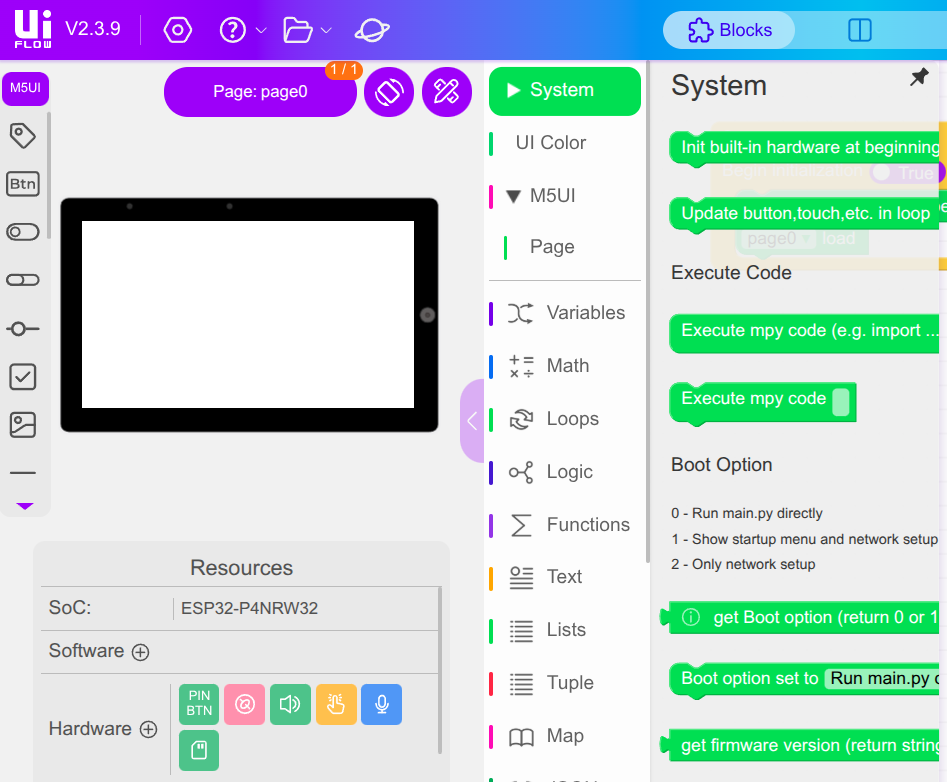
You can see I reloaded and got V2.3.9. I get the same whether I choose a Tab5 or an Atom Echo. Or M5GFX or M5UI for the Tab5.
-
Hello @ProfHuster
below is an example filled with
print("hello"):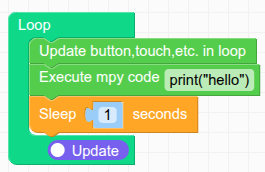
Please also have a look at my example in the UIFlow2 Project Zone called: M5Tab5_ExecuteMpyCodeTest_UIFlow2.3.9
Thanks
FelixGPIO translation table M5Stack / M5Core2
Information about various M5Stack products.
Examples -
Thanks, that worked. I think what happened is I clicked on the code window and did some editing, then went back to the blockly panel. It seemed when I did that, the blockly no longer updated the actual python code.
I will check out your examples,
Prof Huster
-
Hello @ProfHuster
yes, that is what I observed too. As long as edit mode in Python code window is enabled, changes on the blockly side get ignored. (I guess that's to prevent changes from being overwritten.)
Thanks
Felix


Hello! It looks like you're interested in this conversation, but you don't have an account yet.
Getting fed up of having to scroll through the same posts each visit? When you register for an account, you'll always come back to exactly where you were before, and choose to be notified of new replies (either via email, or push notification). You'll also be able to save bookmarks and upvote posts to show your appreciation to other community members.
With your input, this post could be even better 💗
Register Login