Read Program back from Core?
-
I have a StickC Plus with a working program on it, but i lost the source file.
Is there a way to read a blockly/python script from a Core device?-
I assume the python source code is on the Core Device and being run through a MicroPython interpreter.
Is that correct, or is the Soruce being compiled down to something else before it is downloaded to the Core? -
Assuming 1. is correct, is there a way to read back the python script?
(appart from reading it back directly from the flash chip with a programmer and extracting from there)
-
-
@sirtet
Yes, the code is in the Core's /flash/main.py, and can be read directly using the UiFlow2.0 terminal. -
-
Thanks.
@kuriko, i did not get UiFlow2 to work yet on my StickCPlus (With Firmware 1.13.8). Trying the UiFlow2 Firmware, i only get a blank screen.
But i see i can connect to my Stick in UIFlow1.0 too.
I get to the REPL interface, with os.getcwd() i can see that i am in /flash.
Yes. main.py is what i was looking for.
But i have some questions:
If i use the APPList from the boot menu, some .py scripts are listed, temp, main, test and MyCustomCode.py
in /flash, there is main and temp.
Then, there's a DIR named apps. In it, there's again main.py and MyCustomCode.py.
What's the logic here, how did all the scripts end up where they are?
I guess the "current" one is always copied to main.py, but what's with temp.py and test.py? I am not aware of ever using these names.
Maybe there's a help doc. on the topic that i should read?@Cognitive5525, with Thonny, i don't see how to get to the file i need. I guess i would need to connect to my Stick first, but don't see anything about it in the menus...
-
@sirtet Are you using the correct Stick C UIFlow firmware?
There are 3 different StickC revisions. the blank screen suggest that you have the wrong version loaded. -
@ajb2k3 Thanks. Yes, i am aware of StickC/plus/2plus, should be on the right one, will check again.
As for loading a script from device, i found the solution. It behaves just like what i was expecting:
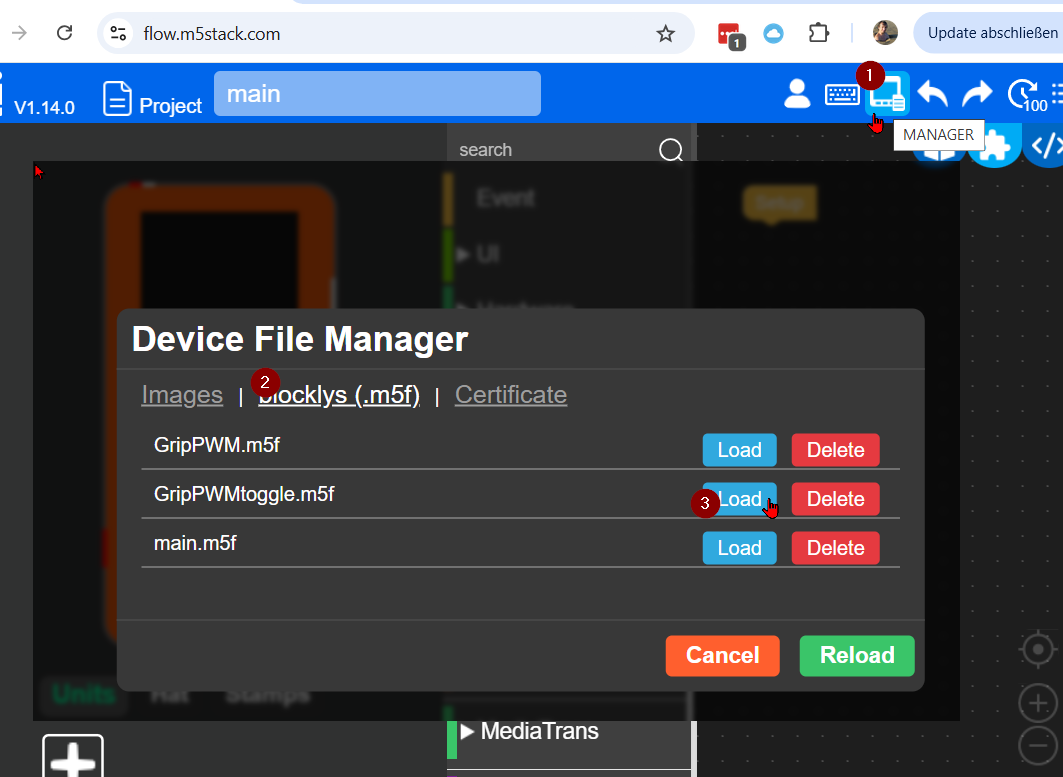
What's not entirely clear to me yet is how scripts are saved on the device. I mean, will it be every new project name? Easy to test, but i did not yet...
If anybody from M5Stack is reading here:
The Fact that i did not find the solution and then 3 People answering without finding the correct answer is a strong indicator that the UI is not self-explanatory enough.
It's not logical that there's a LOAD Icon (load from PC), with the LOAD (from device) is hidden in a different icon's submenu.
I think the LOAD Button should lead to an options-dialogue "-from host / -fromdevice"


Hello! It looks like you're interested in this conversation, but you don't have an account yet.
Getting fed up of having to scroll through the same posts each visit? When you register for an account, you'll always come back to exactly where you were before, and choose to be notified of new replies (either via email, or push notification). You'll also be able to save bookmarks and upvote posts to show your appreciation to other community members.
With your input, this post could be even better 💗
Register Login