M5Tough "TOUGH TOOLS" source code?
-
Hello, my name is Alan (user name: abartky) and I just purchased, received, opened up and powered up an M5Tough system.
So I'm ready to start trying it out to program it, but I really like the "TOUGH TOOLS" app that it shipped with pre-installed and boots up with by default. The app is pretty impressive as it does a good job of showing what the system can do for both Hardware and Firmware capabilities. So I want to start experimenting with it while at the same time have the ability to restore that program in the unit.So I was wondering if there is source code for this to get and build from and then install, and/or some kind of image that if I want to, I can restore it by re-flashing the system?
Thanks,
Alan -
-
Felix,
Thanks for the reply. About an hour or so after setting up the Arduino tools for the M5 Stack, I downloaded the M5Tough repository with a Zip file and extracted to the Arduino libraries and came across and recognized the "Factory Test" as the "M5TOUGH TOOLS" source code. Where that code was in the M5Tough-masterThen when trying to compile it, I found I also had to download and drop in the code from github for M5Unified-master, M5GFX-master to get the build to complete OK. While at it, I also downloaded the M5Stack-master for other examples as well.
With building the Factory Test program, I was able to go back and forth between "Hello World" and the Factory Test, so I'm a happy camper.
One thing I did notice is that Factory Test program is quite extensive and for some reason, when I did a "Save as" to try and make modifications, it no longer compiled (looks like maybe some path/setup issue in looking for files).
So I'll try and solve that some other time, I'm up and running now and so far, I like what I see.
Thanks and best regards,
Alan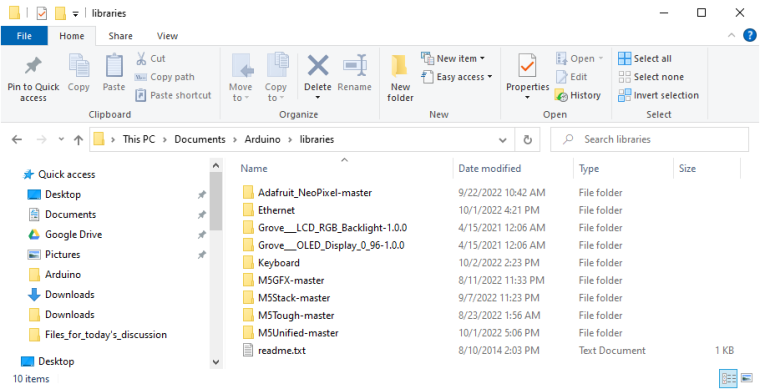

Hello! It looks like you're interested in this conversation, but you don't have an account yet.
Getting fed up of having to scroll through the same posts each visit? When you register for an account, you'll always come back to exactly where you were before, and choose to be notified of new replies (either via email, or push notification). You'll also be able to save bookmarks and upvote posts to show your appreciation to other community members.
With your input, this post could be even better 💗
Register Login