🤖Have you ever tried Chat.M5Stack.com before asking??😎
    M5Stack Community
    • Categories
    • Recent
    • Tags
    • Popular
    • Users
    • Groups
    • Search
    • Register
    • Login

    Writing and re-writing text?

    Scheduled Pinned Locked Moved Core 2
    7 Posts 4 Posters 11.4k Views
    Loading More Posts
    • Oldest to Newest
    • Newest to Oldest
    • Most Votes
    Reply
    • Reply as topic
    Log in to reply
    This topic has been deleted. Only users with topic management privileges can see it.
    • D Offline
      david-bethesda
      last edited by

      I'm trying to create a text area on the screen where I can write some text (like a sensor value) and then periodically replace this with new text somehow. I can't find anything about how to do common operations like this. How do I erase the prior value and replace it with the new value? thanks

      1 Reply Last reply Reply Quote 0
      • ajb2k3A Offline
        ajb2k3
        last edited by

        You can hold use a label to display a sensor value and place it inside a loop so that it will constantly check the sensors reading and update the value.

        UIFlow, so easy an adult can learn it!
        If I don't know it, be patient!
        I've ether not learned it or am too drunk to remember it!
        Author of the WIP UIFlow Handbook!
        M5Black, Go, Stick, Core2, and so much more it cant be fit in here!

        1 Reply Last reply Reply Quote 0
        • D Offline
          david-bethesda
          last edited by david-bethesda

          Thanks @ajb2k3 but I'm writing this particular code in C++ / Arduino so I'm using M5.Lcd

          A 1 Reply Last reply Reply Quote 0
          • A Offline
            AgreeDK @david-bethesda
            last edited by

            @david-bethesda you select where to write the text, x & y, then make a function to first erase the area with fill rect and then write the new text at x,y

            D 1 Reply Last reply Reply Quote 0
            • D Offline
              david-bethesda @AgreeDK
              last edited by david-bethesda

              @agreedk thanks! I guess that means I have to figure out how tall a font is in pixels, and how wide the phrase is, ugh. Feels very imprecise and clunky.

              1 Reply Last reply Reply Quote 0
              • M Offline
                macsbug
                last edited by macsbug

                Hello @david-bethesda

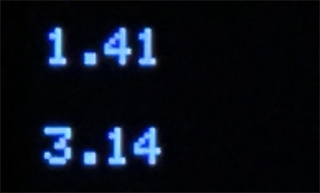
                Use "backgroundcolor"

                setTextColor(uint16_t color, uint16_t backgroundcolor);
                m5-docs/docs/en/api/lcd.md
                https://github.com/m5stack/m5-docs/blob/master/docs/en/api/lcd.md

                #include <M5Stack.h>
                void setup() {
                M5.begin();
                M5.Lcd.setTextSize(2);

                // Numerical Value
                M5.Lcd.setCursor(5, 10);
                M5.Lcd.setTextColor(TFT_WHITE, TFT_BLACK);
                M5.Lcd.println(123456.78);
                M5.Lcd.setCursor(5, 10);
                M5.Lcd.println(" "); // "........."
                M5.Lcd.setCursor(5, 10);
                M5.Lcd.println(1.41);

                // Stirng
                M5.Lcd.setCursor(5, 50);
                M5.Lcd.println("987654.32");
                M5.Lcd.setCursor(5, 50);
                M5.Lcd.println(" "); // "........."
                M5.Lcd.setCursor(5, 50);
                M5.Lcd.setTextColor(TFT_WHITE, TFT_BLACK);
                M5.Lcd.println("3.14");

                }

                void loop() {

                }

                If there is no background color
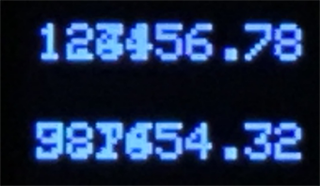
                0_1649211605482_t1.png

                If there is a background color
                0_1649211646347_t2.png

                D 1 Reply Last reply Reply Quote 0
                • D Offline
                  david-bethesda @macsbug
                  last edited by

                  @macsbug Thank you!

                  1 Reply Last reply Reply Quote 0

                  Hello! It looks like you're interested in this conversation, but you don't have an account yet.

                  Getting fed up of having to scroll through the same posts each visit? When you register for an account, you'll always come back to exactly where you were before, and choose to be notified of new replies (either via email, or push notification). You'll also be able to save bookmarks and upvote posts to show your appreciation to other community members.

                  With your input, this post could be even better 💗

                  Register Login
                  • First post
                    Last post