Writing and re-writing text?
-
I'm trying to create a text area on the screen where I can write some text (like a sensor value) and then periodically replace this with new text somehow. I can't find anything about how to do common operations like this. How do I erase the prior value and replace it with the new value? thanks
-
You can hold use a label to display a sensor value and place it inside a loop so that it will constantly check the sensors reading and update the value.
-
Thanks @ajb2k3 but I'm writing this particular code in C++ / Arduino so I'm using M5.Lcd
-
@david-bethesda you select where to write the text, x & y, then make a function to first erase the area with fill rect and then write the new text at x,y
-
@agreedk thanks! I guess that means I have to figure out how tall a font is in pixels, and how wide the phrase is, ugh. Feels very imprecise and clunky.
-
Hello @david-bethesda
Use "backgroundcolor"
setTextColor(uint16_t color, uint16_t backgroundcolor);
m5-docs/docs/en/api/lcd.md
https://github.com/m5stack/m5-docs/blob/master/docs/en/api/lcd.md#include <M5Stack.h>
void setup() {
M5.begin();
M5.Lcd.setTextSize(2);// Numerical Value
M5.Lcd.setCursor(5, 10);
M5.Lcd.setTextColor(TFT_WHITE, TFT_BLACK);
M5.Lcd.println(123456.78);
M5.Lcd.setCursor(5, 10);
M5.Lcd.println(" "); // "........."
M5.Lcd.setCursor(5, 10);
M5.Lcd.println(1.41);// Stirng
M5.Lcd.setCursor(5, 50);
M5.Lcd.println("987654.32");
M5.Lcd.setCursor(5, 50);
M5.Lcd.println(" "); // "........."
M5.Lcd.setCursor(5, 50);
M5.Lcd.setTextColor(TFT_WHITE, TFT_BLACK);
M5.Lcd.println("3.14");}
void loop() {
}
If there is no background color
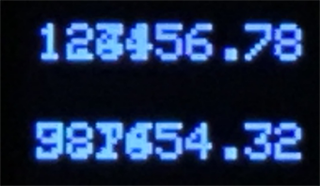
If there is a background color
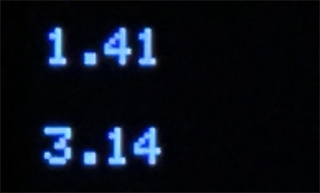
-
@macsbug Thank you!

Hello! It looks like you're interested in this conversation, but you don't have an account yet.
Getting fed up of having to scroll through the same posts each visit? When you register for an account, you'll always come back to exactly where you were before, and choose to be notified of new replies (either via email, or push notification). You'll also be able to save bookmarks and upvote posts to show your appreciation to other community members.
With your input, this post could be even better 💗
Register Login