I was wondering if I could use the M5GO Bottom 3 with the Tab 5 as they both have the same pinout and it should theoretically work?
What are your thoughts?
R
Offline
Posts
-
Is it possible to use the M5GO Bottom 3 with the Tab 5
-
Core S3 m5ui/port.py callback error
I'm not sure whether anyone else is having this issue but my Core S3 keeps saying:
Traceback (most recent call last):
  File "m5ui/port.py", line 40, in timer_cb
KeyboardInterrupt:
I have tried python code on UIFlow 2 and blocks in UIFlow 2 but neither seem to work. It seems that with no blocks in the loop the Core S3 works fine but with a loop block and something inside it then it just crashes with that error.
import os, sys, io
import M5
from M5 import *
import m5ui
import lvgl as lv
from unit import GPSV11Unit


TimeburnerxJB8_20px = None
TimeburnerBold_peGR_70px = None
page0 = None
image0 = None
timelabel = None
battlabel = None
label0 = None
label1 = None
label2 = None
image1 = None
label3 = None
label4 = None
gpssma_0 = None


date1 = None
spd = None


def setup():
  global TimeburnerxJB8_20px, TimeburnerBold_peGR_70px, page0, image0, timelabel, battlabel, label0, label1, label2, image1, label3, label4, gpssma_0, date1, spd

  M5.begin()
  Widgets.setRotation(1)
  m5ui.init()
  TimeburnerxJB8_20px = lv.binfont_create("S:/flash/res/font/TimeburnerxJB8-20px.bin")
  TimeburnerBold_peGR_70px = lv.binfont_create("S:/flash/res/font/TimeburnerBold-peGR-70px.bin")
  page0 = m5ui.M5Page(bg_c=0x000000)
  image0 = m5ui.M5Image("/flash/res/img/GPS.png", x=257, y=0, rotation=0, scale_x=0.6, scale_y=0.6, parent=page0)
  timelabel = m5ui.M5Label("00:00", x=277, y=0, text_c=0xffffff, bg_c=0xffffff, bg_opa=0, font=lv.font_montserrat_14, parent=page0)
  battlabel = m5ui.M5Label("100%", x=0, y=0, text_c=0xffffff, bg_c=0xffffff, bg_opa=0, font=lv.font_montserrat_14, parent=page0)
  label0 = m5ui.M5Label("100", x=0, y=79, text_c=0xffffff, bg_c=0xffffff, bg_opa=0, font=TimeburnerBold_peGR_70px, parent=page0)
  label1 = m5ui.M5Label("mph", x=110, y=120, text_c=0xffffff, bg_c=0xffffff, bg_opa=0, font=TimeburnerxJB8_20px, parent=page0)
  label2 = m5ui.M5Label("10000m", x=72, y=159, text_c=0xffffff, bg_c=0xffffff, bg_opa=0, font=TimeburnerBold_peGR_70px, parent=page0)
  image1 = m5ui.M5Image("/flash/res/img/satellite.png", x=235, y=2, rotation=0, scale_x=0.6, scale_y=0.6, parent=page0)
  label3 = m5ui.M5Label("HDG:", x=140, y=45, text_c=0xffffff, bg_c=0xffffff, bg_opa=0, font=lv.font_montserrat_14, parent=page0)
  label4 = m5ui.M5Label("360", x=188, y=40, text_c=0xffffff, bg_c=0xffffff, bg_opa=0, font=TimeburnerBold_peGR_70px, parent=page0)

  gpssma_0 = GPSV11Unit(2, port=(18, 17))
  page0.screen_load()
  gpssma_0.set_work_mode(7)
  gpssma_0.set_time_zone(0)


def loop():
  global TimeburnerxJB8_20px, TimeburnerBold_peGR_70px, page0, image0, timelabel, battlabel, label0, label1, label2, image1, label3, label4, gpssma_0, date1, spd
  M5.update()
  date1 = []
  date1 = gpssma_0.get_gps_time()
  timelabel.set_text(str((str((date1[0])) + str(((str(':') + str((date1[1]))))))))
  timelabel.align_to(page0, lv.ALIGN.TOP_RIGHT, 0, 0)
  if (gpssma_0.get_satellite_num()) == 0:
    image0.set_flag(lv.obj.FLAG.HIDDEN, False)
    image1.set_flag(lv.obj.FLAG.HIDDEN, True)
  else:
    image1.set_flag(lv.obj.FLAG.HIDDEN, False)
    image0.set_flag(lv.obj.FLAG.HIDDEN, True)
  label2.set_text(str(gpssma_0.get_altitude()))
  label2.align_to(page0, lv.ALIGN.BOTTOM_RIGHT, 0, 0)
  spd = int(gpssma_0.get_speed_over_ground())
  spd = spd * 1.151
  label0.set_text(str(str(spd)))
  label0.align_to(page0, lv.ALIGN.LEFT_MID, 0, 0)
  battlabel.set_text(str((str((str((Power.getBatteryLevel())))) + str('%'))))
  battlabel.align_to(page0, lv.ALIGN.TOP_LEFT, 0, 0)
  label4.set_text(str(gpssma_0.get_corse_over_ground()))


if __name__ == '__main__':
  try:
    setup()
    while True:
      loop()
  except (Exception, KeyboardInterrupt) as e:
    try:
      m5ui.deinit()
      from utility import print_error_msg
      print_error_msg(e)
    except ImportError:
      print("please update to latest firmware")
That was the code that hasn't worked.
Any help much appreciated,
RPi -
RE: Installation .bin files to the M5StickC plus2 RAM
@MurzikYEET I think that you cannot do this if you want the firmware to run while the device is on. The way all computers work is they load the program into RAM and then run it from there. The firmware just tells the computer what to do (in this case, open boot the device and then run the python file).
I believe you can't flash two sets of firmware from M5Burner anyway because each time, it erases the whole device before starting again.
With esptool the same applies. It can't load firmware into the RAM. What it does do is load the stub loader which helps the device and esptool install faster.However there is a way to do it. I myself am not familiar with it but I believe that you can create OTA slots that store firmware in different slots on the device and then you can boot into different firmware.
Here is documentation on OTA: Espressif Docs
Hope this helps,
RPi -
RE: Загрузка кастомной прошивки через uiflow2 на M5Stick plus2
@MurzikYEET Use the link to the Burner: https://docs.m5stack.com/en/uiflow/m5burner/intro
Then select and download the version for your computer.
Run the app.
Select the M5Stick Plus 2 from the left side bar.
Select the top firmware (official) and click download then burn.
If required, sign in and then configure the settings before waiting for the burn to finish. Then try on UIFlow 2.0 again.
Hope that helps,
RPi -
RE: Port A power
@RPI25 It's fine. I have a Core S3 now so I don't need to use my Core 2 so much.
Thanks for trying,
RPi -
RE: Загрузка кастомной прошивки через uiflow2 на M5Stick plus2
@MurzikYEET I'm not sure as google translate may have got the translation wrong but have you tried the offline app?
M5Burner
Google Translate: Я не уверена, возможно, Google Translate перевел неправильно, но вы пробовали использовать приложение в автономном режиме?
Hope that helps
RPi -
RE: UiFlow 2.1.3 Web app export to .py for use on CoreS3
@sssouthpaw Yes I think the only way to do it is to copy the python file and then paste it into Thonny or VSCode before uploading through the file manager in the UIFlow terminal to get the python file on the device.
-
RE: UIFLOW V2.3.9
If you feel like the canvas method is too much effort - especially if it part of a larger project or you prefer M5GFX - then here is a working switch in M5GFX:
import os, sys, io import M5 from M5 import * import time Switch1 = None Switch2 = None Switch3 = None Knob = None state = None touch = None # Describe this function... def Off(): global state, touch, Switch1, Switch2, Switch3, Knob state = 0 Knob.setCursor(x=145, y=119) Switch1.setColor(color=0x999999, fill_c=0x999999) Switch2.setColor(color=0x999999, fill_c=0x999999) Knob.setColor(color=0xffffff, fill_c=0xffffff) # Describe this function... def On(): global state, touch, Switch1, Switch2, Switch3, Knob state = 1 Knob.setCursor(x=174, y=119) Switch2.setColor(color=0x33ccff, fill_c=0x33ccff) Switch3.setColor(color=0x33ccff, fill_c=0x33ccff) Knob.setColor(color=0xffffff, fill_c=0xffffff) def setup(): global Switch1, Switch2, Switch3, Knob, state, touch M5.begin() Widgets.setRotation(1) Widgets.fillScreen(0x222222) Switch1 = Widgets.Circle(174, 119, 14, 0xa4a4a4, 0xa4a4a4) Switch2 = Widgets.Rectangle(145, 105, 28, 28, 0xa4a4a4, 0xa4a4a4) Switch3 = Widgets.Circle(145, 119, 14, 0xa4a4a4, 0xa4a4a4) Knob = Widgets.Circle(145, 119, 14, 0xffffff, 0xffffff) Off() def loop(): global Switch1, Switch2, Switch3, Knob, state, touch M5.update() touch = M5.Touch.getCount() if touch != 0: if (M5.Touch.getX()) >= 131 and (M5.Touch.getX()) <= 188 and (M5.Touch.getY()) >= 105 and (M5.Touch.getY()) <= 133: if state == 0: On() else: Off() time.sleep_ms(500) if __name__ == '__main__': try: setup() while True: loop() except (Exception, KeyboardInterrupt) as e: try: from utility import print_error_msg print_error_msg(e) except ImportError: print("please update to latest firmware") -
RE: UIFLOW V2.3.9
I have tried to recreate your image here in this code.
page0 = None switch0 = None canvas0 = None def setup(): global page0, switch0, canvas0 M5.begin() Widgets.setRotation(1) m5ui.init() page0 = m5ui.M5Page(bg_c=0xffffff) switch0 = m5ui.M5Switch(x=130, y=184, w=60, h=30, bg_c=0xe7e3e7, bg_c_checked=0x2196f3, circle_c=0xffffff, parent=page0) canvas0 = m5ui.M5Canvas(x=5, y=5, w=310, h=150, color_format=lv.COLOR_FORMAT.ARGB8888, bg_c=0xffffff, bg_opa=255, parent=page0) page0.screen_load() def loop(): global page0, switch0, canvas0 M5.update() if (switch0.has_state(lv.STATE.CHECKED)) == False: canvas0.draw_arc(155, 75, 50, color=0xc0c0c0, opa=255, width=15, start_angle=300, end_angle=240) canvas0.draw_line(155, 20, 155, 75, color=0xc0c0c0, opa=255, width=20) else: canvas0.draw_arc(155, 75, 50, color=0x33cc00, opa=255, width=15, start_angle=300, end_angle=240) canvas0.draw_line(155, 20, 155, 75, color=0x33cc00, opa=255, width=20) -
RE: UIFLOW V2.3.9
@Amani4791 As far as I can see, using a Core S3:
When I use M5UI I get the same results: the picture loads slowly.
With M5GFX: There aren't any touchscreen elements. So to have a switch, you would have to make one custom.
To do what you are trying to do, I would recommend using a canvas and a switch from M5UI and just manually creating the shapes in the canvas using code because that will make the draw process on the screen much faster.
Hope that helps,
RPi -
IR Unit with Core S3
I was trying to use the IR Unit with my Core S3 in blocks (UIFlow 2.4.0) and it keeps saying there is an invalid timer time. On Port B, with just the Init block and/or the send block, it works fine. No errors. But when I try to receive data, it just brings back the timer error:
Traceback (most recent call last):
  File "<stdin>", line 37, in <module>
  File "<stdin>", line 29, in setup
  File "unit/ir.py", line 24, in rx_cb
  File "driver/ir/nec.py", line 116, in __init__
  File "driver/ir/nec.py", line 67, in __init__
  File "driver/ir/receiver.py", line 47, in __init__
ValueError: invalid Timer number

>>>
Here is the auto generated code that produced the errors:
import os, sys, io
import M5
from M5 import *
import m5ui
import lvgl as lv
from unit import IRUnit
import time


page0 = None
label0 = None
label1 = None
ir_0 = None


add = None
dat = None


def ir_0_rx_event(_data, _addr, _ctrl):
  global page0, label0, label1, ir_0, add, dat
  dat = _data
  add = _addr
  time.sleep(1)


def setup():
  global page0, label0, label1, ir_0, add, dat

  M5.begin()
  Widgets.setRotation(1)
  m5ui.init()
  page0 = m5ui.M5Page(bg_c=0xffffff)
  label0 = m5ui.M5Label("label0", x=71, y=65, text_c=0x000000, bg_c=0xffffff, bg_opa=0, font=lv.font_montserrat_14, parent=page0)
  label1 = m5ui.M5Label("label1", x=69, y=104, text_c=0x000000, bg_c=0xffffff, bg_opa=0, font=lv.font_montserrat_14, parent=page0)

  ir_0 = IRUnit((8, 9))
  ir_0.rx_cb(ir_0_rx_event)
  page0.screen_load()
  add = 0
  dat = 0


def loop():
  global page0, label0, label1, ir_0, add, dat
  M5.update()


if __name__ == '__main__':
  try:
    setup()
    while True:
      loop()
  except (Exception, KeyboardInterrupt) as e:
    try:
      m5ui.deinit()
      from utility import print_error_msg
      print_error_msg(e)
    except ImportError:
      print("please update to latest firmware")
Here is the block code:
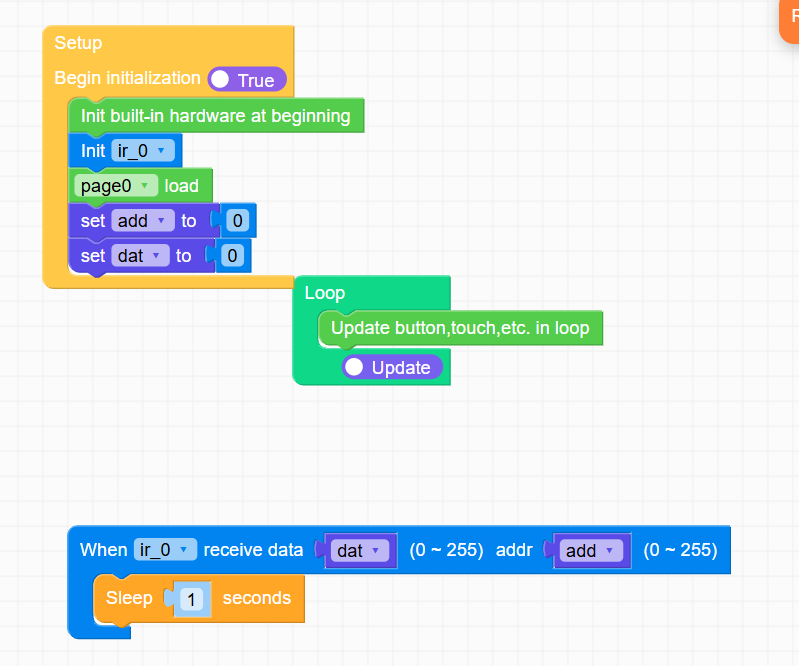
Any help much appreciated! -
RE: Port A power
Hello @felmue
I did select the Port A for the RGB Units, I have tried connecting it to both sides but neither work... That is the same with both RGB Units.
Thanks,
RPI25 -
RE: Port A power
Hello @felmue
I was trying it with 3 leds (The standard unit) and it is powered by the standard USB C cable that comes with the Core 2.
Thanks,
RPI25 -
RE: Port A power
@felmue I have now tested my Grove cable along with Port A which is "working" with my CardKB:
E (48366) i2c: i2c driver install error
E (48399) i2c: i2c driver install error
Traceback (most recent call last):
  File "<stdin>", line 35, in <module>
  File "<stdin>", line 30, in loop
  File "unit/cardkb.py", line 66, in tick
  File "unit/cardkb.py", line 60, in is_pressed
  File "unit/cardkb.py", line 39, in _get_key
OSError: [Errno 116] ETIMEDOUT
When I press the function key the RGB Led onboard lights up so the unit is receiving power but when I try the RGB Unit it still doesn't work with either one. I have seen a flicker of light at one point if that is helpful information.
Thanks,
RPI25 -
RE: Port A power
@felmue Thanks so much for your help! I tried your example which runs fine on my Core 2 but still the RGB Unit doesn't show any light. I have tried a second one but I received no further results. I am currently trying a new way of powering the RGB Unit by importing the RGB Unit through the Unit selection menu and then using those blocks.

But that doesn't seem to help either. I assume that in the new firmware, M5Stack hasn't removed the ability to use port A as the port for the RGB Units as I found that they could only be powered by port B in UiFlow 1. I have several other grove cables that I am going to try and then also test to see if any other units work through port A (like CardKB and ENV III) and will send any further information if you would like.
Thank you for your help,
RPI25 -
Port A power
I was trying to use a RGB unit with Port A in firmware V2.3.7 for Core 2but the RGB unit just doesn't illuminate. I read in a post created by @Handcannon (https://community.m5stack.com/topic/7829/uiflow2-0-tab5) that Port A is not receiving power in V2.3.7 and V2.3.6 for Tab 5 but V2.3.6 Hotfix worked.
I tried it and it didn't work as I assumed the firmware would have the same handling for Port A. I have now tried Core 2 V2.3.4 to V2.3.7 and none of them work. Any help would be much appreciated!
Thanks -
RE: UIFlow2.0 Tab5
@felmue said in UIFlow2.0 Tab5:
Hello @Handcannon
yes, I see that too. It seems that the latest versions (2.3.5 and 2.3.6) have power to port A disabled. E.g. port A has no power.
Please find my example in the UIFlow2 Project Zone which manually turns on power to port A: M5Tab5_Enable_Ext5V_EnvIV_Test_UIFlow2.3.6
I created an issue on github for this issue.
Thanks
FelixI tried recreating your M5Tab5 script for the Core 2 and got these results:
(I realise that the RGB Unit doesn't use I2C but for port A to work I think I need to set it up in the same way anyway.)
The code:import os, sys, io import M5 from M5 import * import m5ui import lvgl as lv from unit import RGBUnit from hardware import I2C from hardware import Pin import time page0 = None switch0 = None i2c0 = None rgb_0 = None bytearrayone = None def setup(): global page0, switch0, i2c0, rgb_0, bytearrayone M5.begin() Widgets.setRotation(1) m5ui.init() page0 = m5ui.M5Page(bg_c=0xffffff) switch0 = m5ui.M5Switch(x=130, y=105, w=60, h=30, bg_c=0xe7e3e7, bg_c_checked=0x2196f3, circle_c=0xffffff, parent=page0) page0.screen_load() bytearrayone = bytearray(1) i2c0 = I2C(0, scl=Pin(33), sda=Pin(32), freq=100000) i2c0.readfrom_mem_into(0x43, 0x03, bytearrayone) # set PI4IO P2 (Ext5V enable) as output print(hex(myByteArr[0])) myByteArr[0] |= 0x04 print(hex(myByteArr[0])) i2c0.writeto_mem(0x43, 0x03, bytearrayone) i2c0.readfrom_mem_into(0x43, 0x05, bytearrayone) # set PI4IO P2 (Ext5V enable) to high print(hex(myByteArr[0])) myByteArr[0] |= 0x04 print(hex(myByteArr[0])) i2c0.writeto_mem(0x43, 0x05, bytearrayone) time.sleep(1) rgb_0 = RGBUnit((33, 32), 3) def loop(): global page0, switch0, i2c0, rgb_0, bytearrayone M5.update() rgb_0.set_brightness(100) if switch0.has_state(lv.STATE.CHECKED): rgb_0.set_color(0, 0x6600cc) else: rgb_0.set_color(0, 0x000000) if __name__ == '__main__': try: setup() while True: loop() except (Exception, KeyboardInterrupt) as e: try: m5ui.deinit() from utility import print_error_msg print_error_msg(e) except ImportError: print("please update to latest firmware")1st attempt:
E (725096) i2c: i2c driver install error
E (725128) i2c: i2c driver install error
E (725275) i2c: i2c driver install error
Traceback (most recent call last):
  File "<stdin>", line 49, in <module>
  File "<stdin>", line 25, in setup
OSError: [Errno 116] ETIMEDOUT
2nd attempt:
E (740623) i2c: i2c driver install error E (740655) i2c: i2c driver install error A fatal error occurred. The crash dump printed below may be used to help determine what caused it. If you are not already running the most recent version of MicroPython, consider upgrading. New versions often fix bugs. To learn more about how to debug and/or report this crash visit the wiki page at: https://github.com/micropython/micropython/wiki/ESP32-debugging MPY version : v1.25.0-dirty on 2025-09-30 IDF version : v5.4.2-dirty Machine : M5STACK Core2 with ESP32(SPIRAM) Guru Meditation Error: Core 1 panic'ed (LoadProhibited). Exception was unhandled. Core 1 register dump: PC : 0x40166a09 PS : 0x00060730 A0 : 0x800dc068 A1 : 0x3ffd92f0 A2 : 0x00000000 A3 : 0x3f4329e7 A4 : 0x00000000 A5 : 0x00000000 A6 : 0x00000001 A7 : 0x3ffd92f0 A8 : 0x00000074 A9 : 0x3ffc1090 A10 : 0x00000000 A11 : 0x3ffd94b0 A12 : 0x00000000 A13 : 0x00000001 A14 : 0x00000000 A15 : 0x00000004 SAR : 0x00000020 EXCCAUSE: 0x0000001c EXCVADDR: 0x00000088 LBEG : 0x400945b2 LEND : 0x400945bd LCOUNT : 0x00000000 Backtrace: 0x40166a06:0x3ffd92f0 0x400dc065:0x3ffd9330 0x400f5729:0x3ffd9350 0x400dc46d:0x3ffd9390 0x401ec3f5:0x3ffd93d0 0x401ec4bf:0x3ffd93f0 0x40087c62:0x3ffd9410 0x401e65a8:0x3ffd94b0 0x401ec3f5:0x3ffd9510 0x402161ac:0x3ffd9530 0x402161e9:0x3ffd9570 0x401ec3f5:0x3ffd9590 0x401ec479:0x3ffd95b0 0x402187a4:0x3ffd95e0 0x401ed36c:0x3ffd9660 0x4008739e:0x3ffd9680 0x401e65a8:0x3ffd9720 0x401ec3f5:0x3ffd9770 0x401ec4bf:0x3ffd9790 0x40087c62:0x3ffd97b0 0x401e65a8:0x3ffd9850 0x401ec3f5:0x3ffd9880 0x401ec40e:0x3ffd98a0 0x4021bbf6:0x3ffd98c0 0x4021beda:0x3ffd9950 0x401fde08:0x3ffd9990 ELF file SHA256: 1843f6d45 Rebooting... ets Jul 29 2019 12:21:46 rst:0xc (SW_CPU_RESET),boot:0x13 (SPI_FAST_FLASH_BOOT) configsip: 0, SPIWP:0xee clk_drv:0x00,q_drv:0x00,d_drv:0x00,cs0_drv:0x00,hd_drv:0x00,wp_drv:0x00 mode:DIO, clock div:1 load:0x3fff0030,len:4340 load:0x40078000,len:15972 load:0x40080400,len:4 ho 8 tail 4 room 4 load:0x40080404,len:3656 entry 0x400805c0 _ __ _ _ _(_)/ _| | _____ __ | | | | | |_| |/ _ \ \ /\ / / | |_| | | _| | (_) \ V V / \__,_|_|_| |_|\___/ \_/\_/ V2.3.6-hotfix2 E (2840) i2c: i2c driver install error -
RE: UIFlow2.0 Tab5
@felmue
Ok I can now confirm that Core 2 V2.3.6 hotfix doesn't power port A so I am going back to V2.3.5 to check that - I think it still works.
Core 2:
V2.3.7 - Doesn't power port A (if that is the problem)
V2.3.6 hotfix - Doesn't power port A (if that is the problem)
V2.3.6 - Doesn't power port A (if that is the problem) -
RE: UIFlow2.0 Tab5
Hi @felmue
I was having the same issue with my Core 2 not powering Port A but my Nano C6 still works on V2.3.7 if that helps.
The screen, UI etc work on the Core 2 but the Port A just doesn't do anything.
Thanks.