Getting Started with M5Stack Any Tips for Beginners?
-
Hi everyone,
I’m fairly new to the M5Stack ecosystem and recently started exploring its hardware and development environment. I’ve been really impressed by how modular and beginner-friendly everything seems, especially for IoT and rapid prototyping projects.
Right now, I’m trying to understand the best way to get started with building simple projects. There seem to be multiple development options like Arduino, UIFlow, and MicroPython, and I’m a bit unsure which one is the most efficient for beginners.
I’d love to hear from experienced users here:
What’s the best starting point for someone new?
Any beginner-friendly project ideas you’d recommend?
Common mistakes I should avoid?Also, if you have any resources, tutorials, or personal experiences to share, that would be really helpful.
Looking forward to learning from this amazing community!
Thanks in advance
-
@marryjoseph22 if you want to try Arduino way..i can recommend YT and VolosR approach to M5Stack devices, his UI design is top notch
for beginners uiflow blockly is good start and it can switch easly to micropython in same window
-
Hi, I am a beginner user of M5stack products as well. (a little less than you).
I was attracted like you with the user-friendy side of uiflow and the 'units' modules
So I bought a core2 and an atom lite with different modules.
after a while testing the different functions of uiflow, I started to encounter problems.
I noticed that regarding some videos of yt, I didn’t necessarily have the same version of the firmware. The aids, and the documentation of certain APIs are not sufficiently detailed.
I encountered problems with the core2 and the Env3 unit that worked randomly.
I bought the ultrasonic unit for the Atom lite and when I plugged it in and initialized it, I was surprised to see that it doesn’t work. I also plugged it into my core2 and it’s the same. However, on my atom lite the unit ENV3 works.
To summarize, everything seems beautiful but is not necessarily 'plug and play'.
I’m hesitating to continue with the m5stack and uiflow products and yet I had other purchases to make.
Here is the summary of my first contact with the uiflow2 environment.the message was automatically translated because my level of English and a little limited
-
@marryjoseph22 what M5Stack hardware do you have to play with?
-
@marryjoseph22
Starting with UIFlow is a good choice but there are issues:- If you need something that is not included in UIFlow then you will stuck or need a complicated workaround
- If the UIFlow Website is down you cannot work with
- As it is a interpreter language (micropyhton in the background) don't expect too much calculation speed!
- complex programs can become confusing
There are also benefits:
- very easy for a quick and (not so) dirty proof-of-concept
- easy to understand for beginners
One of my first programs was a TVOC logger with a remote display:
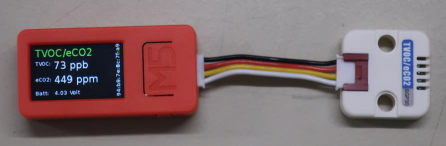
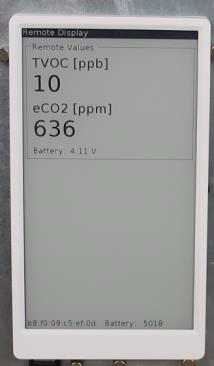
Data transfer from the stick to paper by ESPnow. It took me around 20min per device to program where the most time wasted to design the screens and understand how ESPnow works.Another funny project was two sticks who send each other a simple message of a counter value by ESPnow showing the value on display, play a beep sound, increment the value by 1 and send it back. The other beeps as well, increment and send it back and so on... this was to test how fast it can run and how far the wireless ESPnow connection work.
For more complex programs I prefer the Arduino environment.
- it runs ON MY OWN computer so i am not dependent on the UIFlow cloud systems and website
- more complex programs possible without loosing overview
- many Arduino libraries running out of the box
- much faster program execution / calculations than on micopython / UIFLow
- the web is full of examples
- need a bit more programming skills but still possible for beginners


Hello! It looks like you're interested in this conversation, but you don't have an account yet.
Getting fed up of having to scroll through the same posts each visit? When you register for an account, you'll always come back to exactly where you were before, and choose to be notified of new replies (either via email, or push notification). You'll also be able to save bookmarks and upvote posts to show your appreciation to other community members.
With your input, this post could be even better 💗
Register Login