Chess Game For M5 Stack
-

Chess for M5Stack Tab5
Game Introduction
A full-featured chess game for M5Stack Tab5. Play against AI locally or connect to a remote Stockfish engine for stronger opponents. Standard rules: castling, en passant, promotion, check/checkmate.Features:
Local mode: Human vs built-in AI (no WiFi)
Online mode: Human vs remote Stockfish (WiFi required)
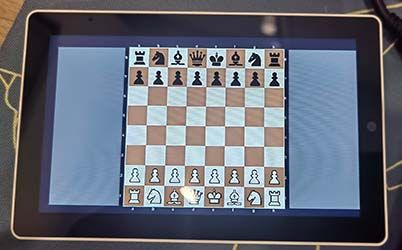
Touch input, board coordinates (a–h, 1–8)
Captured pieces shown on sides
Sound effects for moves and game end
Quick Start
Launch the Chess app from the app launcher.
Choose mode:
Local – Play offline vs device AI
Online – Play vs remote engine (needs WiFi)
Play: Tap a piece to select (yellow highlight), tap a legal square to move.
Promotion: When a pawn reaches the 8th rank, tap Queen/Rook/Knight/Bishop to promote.
Controls
Action How
Select piece Tap your piece
Move Tap a highlighted legal square
Cancel selection Tap the same piece again
Switch piece Tap another of your pieces
Promote pawn Tap Q/R/N/B in the promotion strip
WiFi Setup (for Online mode)
On the app launcher, tap the WiFi button at the top (shows "WiFi Disconnected" when off).
Enter your SSID and password, then tap Connect.
Wait until it shows "WiFi Connected". The Start Chess button will then be enabled.
Saved networks appear in the recent list for quick reconnect.
Requirements
Device: M5Stack Tab5
Online mode: WiFi connected
Firmware: Flash the provided firmware to your Tab5
Tips
Yellow = selected piece. Blue = legal move targets.
Green = last AI move.
Game-over screen shows Restart option.DOWNLOAD:
M5 FirmWare Burner -
Download & Burn the Firmware from M5Burner:
Device Type: Tab5Search: CHESS For M5Stack Tab5
It's that simple! Enjoy The Chess game! 🎮
-
@shmusica
configure the WiFi and Select the Game
Screen Shoot
Hello! It looks like you're interested in this conversation, but you don't have an account yet.
Getting fed up of having to scroll through the same posts each visit? When you register for an account, you'll always come back to exactly where you were before, and choose to be notified of new replies (either via email, or push notification). You'll also be able to save bookmarks and upvote posts to show your appreciation to other community members.
With your input, this post could be even better 💗
Register Login