IR Unit with Core S3
-
I was trying to use the IR Unit with my Core S3 in blocks (UIFlow 2.4.0) and it keeps saying there is an invalid timer time. On Port B, with just the Init block and/or the send block, it works fine. No errors. But when I try to receive data, it just brings back the timer error:
Traceback (most recent call last):
  File "<stdin>", line 37, in <module>
  File "<stdin>", line 29, in setup
  File "unit/ir.py", line 24, in rx_cb
  File "driver/ir/nec.py", line 116, in __init__
  File "driver/ir/nec.py", line 67, in __init__
  File "driver/ir/receiver.py", line 47, in __init__
ValueError: invalid Timer number

>>>
Here is the auto generated code that produced the errors:
import os, sys, io
import M5
from M5 import *
import m5ui
import lvgl as lv
from unit import IRUnit
import time


page0 = None
label0 = None
label1 = None
ir_0 = None


add = None
dat = None


def ir_0_rx_event(_data, _addr, _ctrl):
  global page0, label0, label1, ir_0, add, dat
  dat = _data
  add = _addr
  time.sleep(1)


def setup():
  global page0, label0, label1, ir_0, add, dat

  M5.begin()
  Widgets.setRotation(1)
  m5ui.init()
  page0 = m5ui.M5Page(bg_c=0xffffff)
  label0 = m5ui.M5Label("label0", x=71, y=65, text_c=0x000000, bg_c=0xffffff, bg_opa=0, font=lv.font_montserrat_14, parent=page0)
  label1 = m5ui.M5Label("label1", x=69, y=104, text_c=0x000000, bg_c=0xffffff, bg_opa=0, font=lv.font_montserrat_14, parent=page0)

  ir_0 = IRUnit((8, 9))
  ir_0.rx_cb(ir_0_rx_event)
  page0.screen_load()
  add = 0
  dat = 0


def loop():
  global page0, label0, label1, ir_0, add, dat
  M5.update()


if __name__ == '__main__':
  try:
    setup()
    while True:
      loop()
  except (Exception, KeyboardInterrupt) as e:
    try:
      m5ui.deinit()
      from utility import print_error_msg
      print_error_msg(e)
    except ImportError:
      print("please update to latest firmware")
Here is the block code:
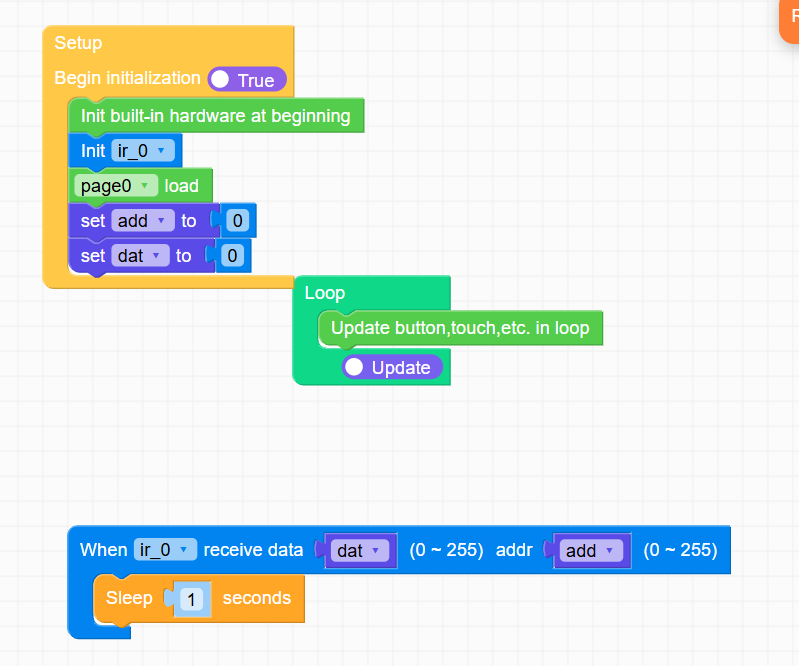
Any help much appreciated! -
@RPI25 I'm having the same issues with same and newer version of UIflow 2.4.2, but with cardputer v1.1,Cardputer ADV, and NANO C6. it seems like devs forget to to put IR libraries or something like that into the firmware and didn't noticed it.
unfortunately they didn't answered me on discord server, and i have no hope getting answer here as well.....sending data? yes, no problem. Built in IR and external, but no recieve Т.Т
-
Hi guys
I can confirm receiving IR from Unit IR is broken for M5Core2 as well.
Thanks
Felix

Hello! It looks like you're interested in this conversation, but you don't have an account yet.
Getting fed up of having to scroll through the same posts each visit? When you register for an account, you'll always come back to exactly where you were before, and choose to be notified of new replies (either via email, or push notification). You'll also be able to save bookmarks and upvote posts to show your appreciation to other community members.
With your input, this post could be even better 💗
Register Login