🤖Have you ever tried Chat.M5Stack.com before asking??😎
    M5Stack Community
    • Categories
    • Recent
    • Tags
    • Popular
    • Users
    • Groups
    • Search
    • Register
    • Login

    4-Relay Unit control with UiFlow
    Scheduled Pinned Locked Moved Modules
    8 Posts 4 Posters 13.6k Views
    Loading More Posts
    • Oldest to Newest
    • Newest to Oldest
    • Most Votes
    Reply
    • Reply as topic
    Log in to reply
    This topic has been deleted. Only users with topic management privileges can see it.
    • LGxL Offline
      LGx
      last edited by

      Hi guys!

      I have played a bit with my 4-Relay Unit in UiFlow, and want to share the result for those who want to program it with blockly.

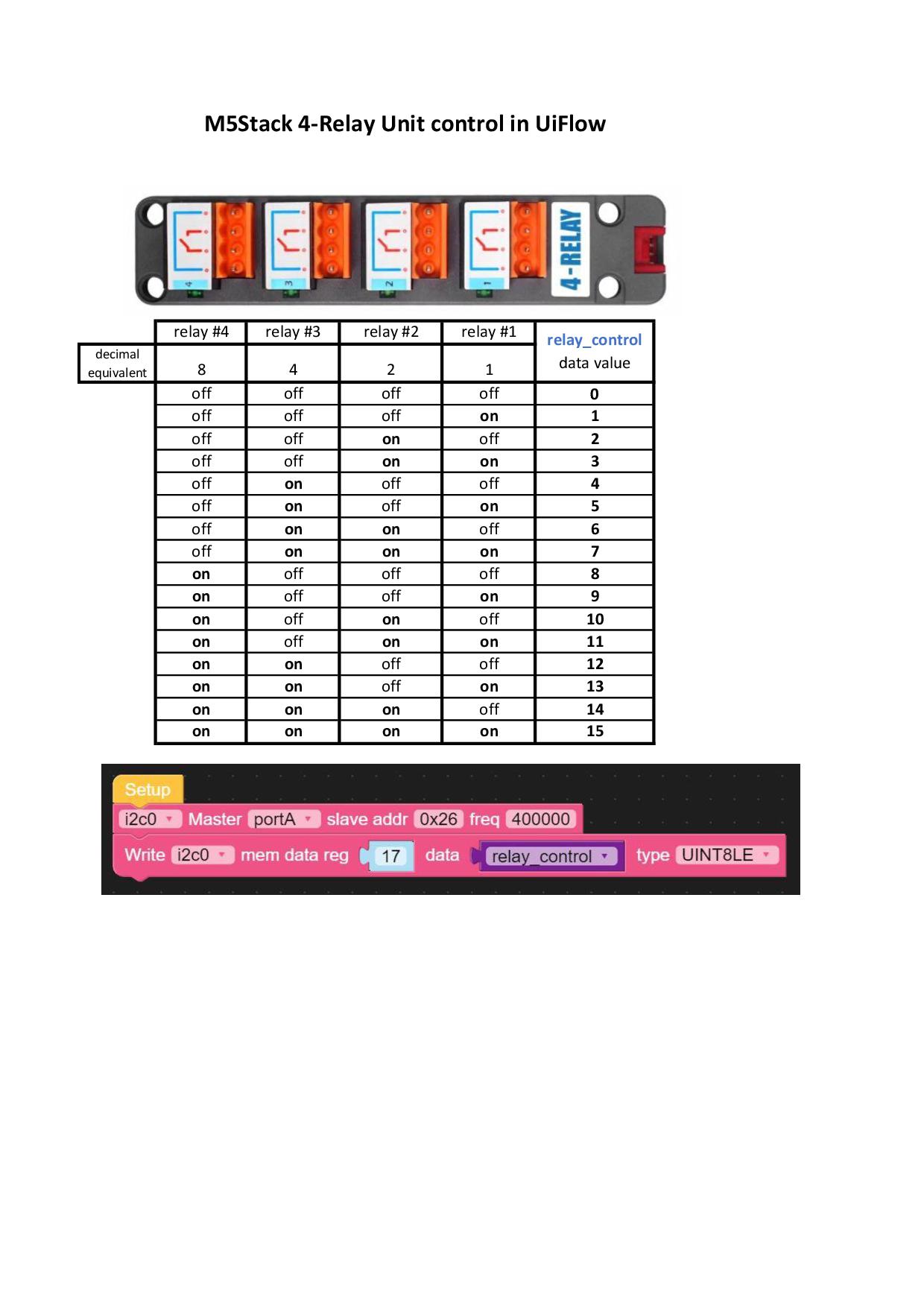
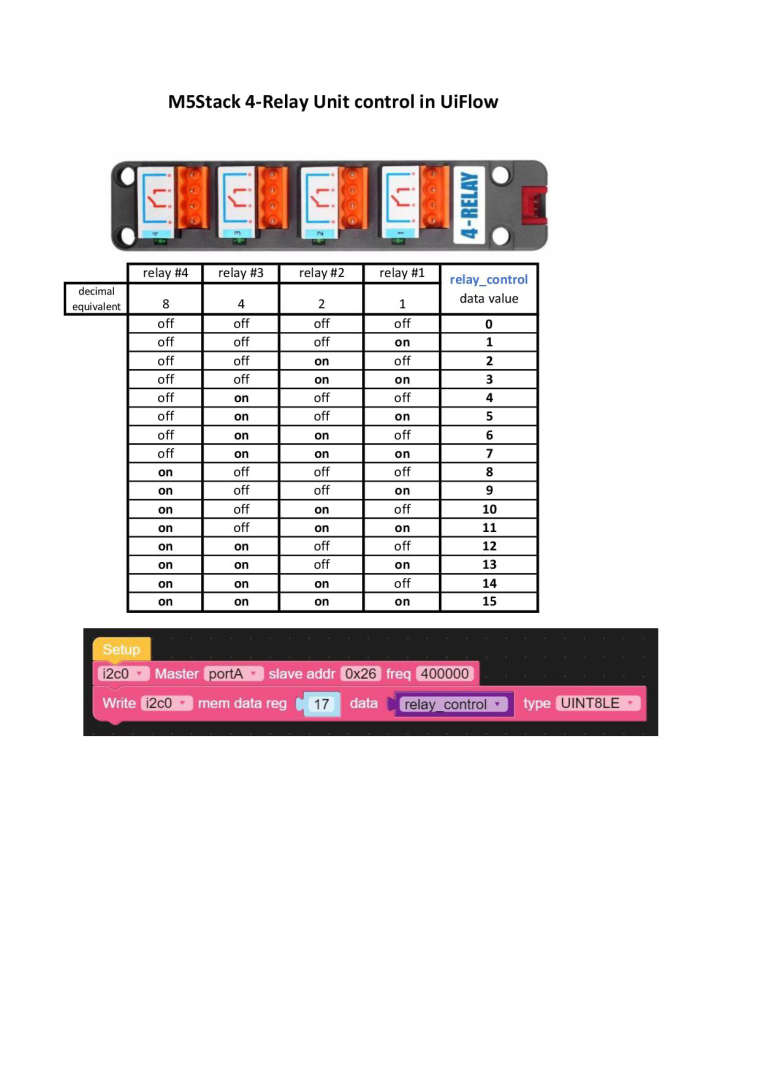
      You can control it with I2C at address 0x26
      The relay control data reg is 0x11 (decimal 17) and the data is the binary state (1-open, 0-closed) of the relays in decimal number.
      If you want to open relay 3, that should be 0100 in binary which is 4 in decimal, so you have to control the relay with the number "4".

      I made a small diagram, I hope it is clear how to use it :)
      0_1615577235686_4relay_control_uiflow.jpg

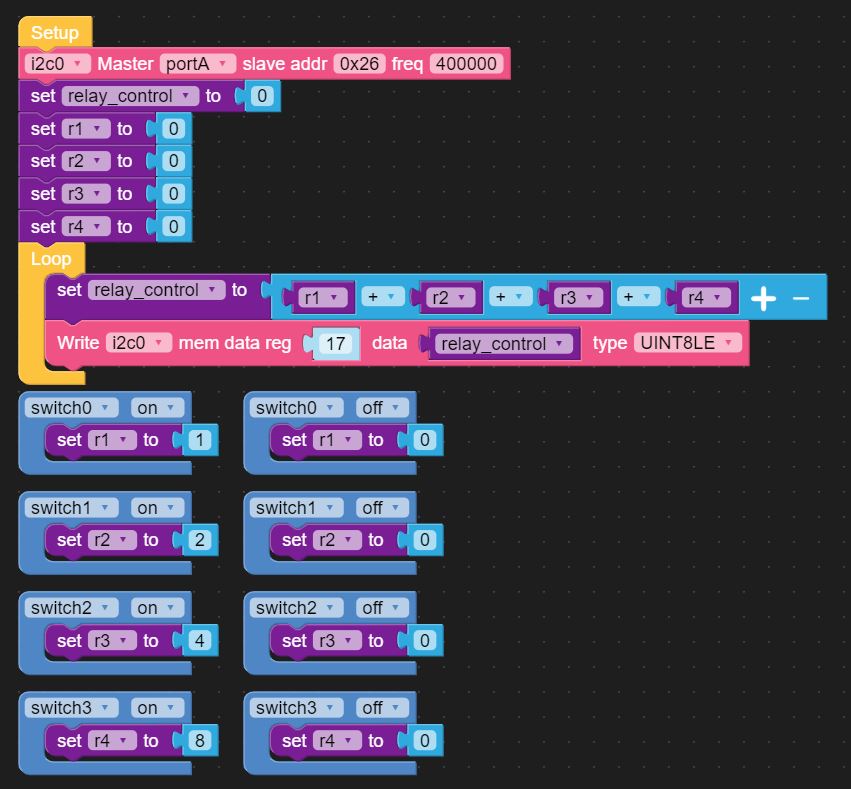
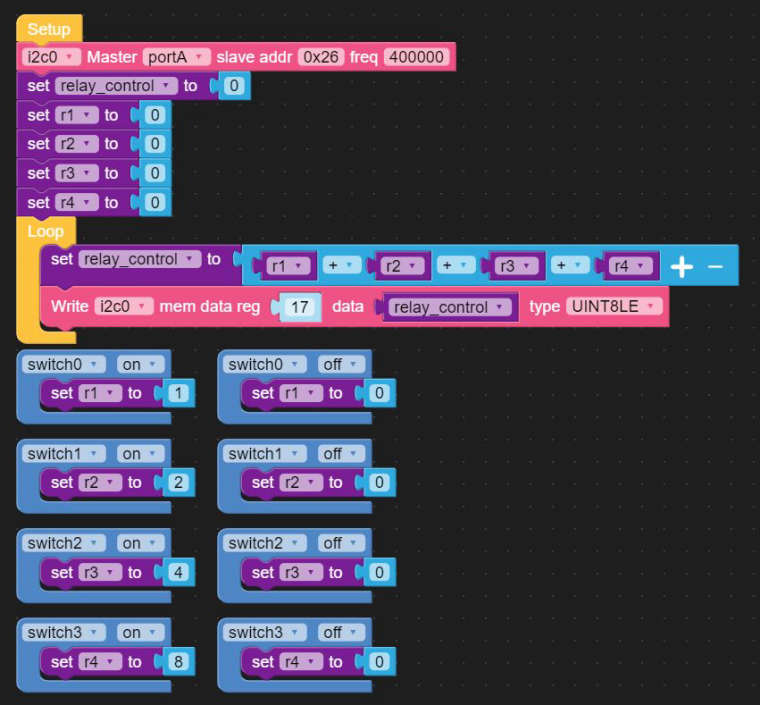
      And here is the blockly diagram of a full 4-Relay control with a Core 2, using four touch switches for individual relay control:
      0_1615577381495_blockly.JPG

      1 Reply Last reply Reply Quote 3
      • ajb2k3A Offline
        ajb2k3
        last edited by

        Thank you for sharing this.

        UIFlow, so easy an adult can learn it!
        If I don't know it, be patient!
        I've ether not learned it or am too drunk to remember it!
        Author of the WIP UIFlow Handbook!
        M5Black, Go, Stick, Core2, and so much more it cant be fit in here!

        1 Reply Last reply Reply Quote 0
        • R Offline
          Rokuemon
          last edited by

          Thanks for the great information.
          And I have a question.
          Is the block in the second half of the last figure a block for 4-Relay Unit?
          My UIFlow (ver.1.7.3) doesn't have a 4-Relay Unit icon, so I can't select it.

          ajb2k3A LGxL 2 Replies Last reply Reply Quote 0
          • ajb2k3A Offline
            ajb2k3 @Rokuemon
            last edited by

            @rokuemon said in 4-Relay Unit control with UiFlow:

            Thanks for the great information.
            And I have a question.
            Is the block in the second half of the last figure a block for 4-Relay Unit?
            My UIFlow (ver.1.7.3) doesn't have a 4-Relay Unit icon, so I can't select it.

            @rokuemon said in 4-Relay Unit control with UiFlow:

            Thanks for the great information.
            And I have a question.
            Is the block in the second half of the last figure a block for 4-Relay Unit?
            My UIFlow (ver.1.7.3) doesn't have a 4-Relay Unit icon, so I can't select it.

            The relay_control blocks are variables that you create and name.

            UIFlow, so easy an adult can learn it!
            If I don't know it, be patient!
            I've ether not learned it or am too drunk to remember it!
            Author of the WIP UIFlow Handbook!
            M5Black, Go, Stick, Core2, and so much more it cant be fit in here!

            1 Reply Last reply Reply Quote 0
            • LGxL Offline
              LGx @Rokuemon
              last edited by LGx

              @rokuemon

              Hi!

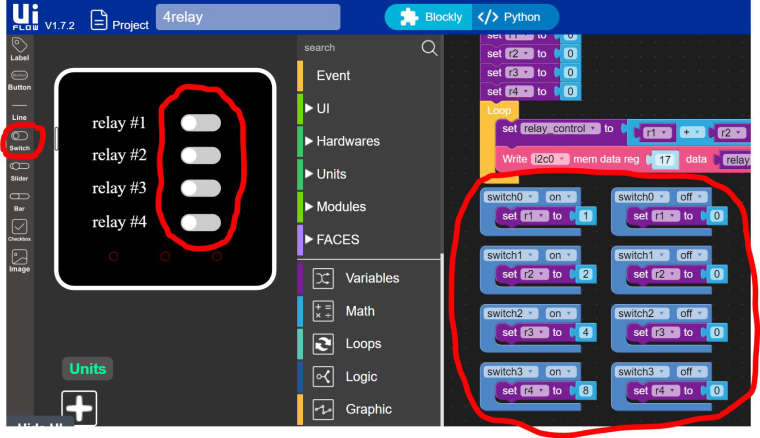
              No, the blocks you are speaking of (the blue ones with switch0, switch1...) are
              the Core 2's touch switches. You can access them in the UI menu after you put them on screen.
              I put 4 of them on screen, to individually control the 4-Relay.
              The 4-Relay Unit is not represented in UiFlow units, you can not select it.
              0_1616010831313_rel.JPG

              R M 3 Replies Last reply Reply Quote 0
              • R Offline
                Rokuemon @LGx
                last edited by

                @lgx
                Thank you for your reply.
                From your information, I knew that it was a Core 2 feature.
                I want to use 4-Relay with my M5stickC.
                I will continue to study UIflow.

                1 Reply Last reply Reply Quote 0
                • M Offline
                  mifi @LGx
                  last edited by

                  This post is deleted!
                  1 Reply Last reply Reply Quote 0
                  • M Offline
                    mifi @LGx
                    last edited by

                    @lgx

                    @lgx
                    Thank you for your information.
                    4 Relay works OK directly connected to Core2.
                    But how can I connect it using PAHUB ?

                    1 Reply Last reply Reply Quote 0

                    Hello! It looks like you're interested in this conversation, but you don't have an account yet.

                    Getting fed up of having to scroll through the same posts each visit? When you register for an account, you'll always come back to exactly where you were before, and choose to be notified of new replies (either via email, or push notification). You'll also be able to save bookmarks and upvote posts to show your appreciation to other community members.

                    With your input, this post could be even better 💗

                    Register Login
                    • First post
                      Last post
