Roller485 with PWRCAN and CORE
-
Hello,
I am trying to get a Roller485 to work with a POWRCAN module attached to a CORE controller but I don't seem to get it to run.
Please note that it does work over I2C.
Here's the configuration:POWERCAN:
12V, line A to line A, line B to line B, TX:G17, RX:G16, terminator enabled.
Roller485:
RS485, node #:1, 115200 Baud, MODE: SpeedI am attaching the UIFlow2 application.
Thank you for your support.import os, sys, io import M5 from M5 import * from module import PwrCANModuleRS485 from unit import Roller485Unit label0 = None pwrcan_0 = None roller485_0 = None def setup(): global label0, pwrcan_0, roller485_0 M5.begin() Widgets.setRotation(1) Widgets.fillScreen(0x222222) label0 = Widgets.Label("label0", 38, 38, 1.0, 0xffffff, 0x222222, Widgets.FONTS.DejaVu18) pwrcan_0 = PwrCANModuleRS485(2, baudrate=115200, bits=8, parity=None, stop=1, tx=17, rx=16) roller485_0 = Roller485Unit(pwrcan_0, address=1, mode=Roller485Unit.RS485_MODE) def loop(): global label0, pwrcan_0, roller485_0 label0.setText(str('Label')) roller485_0.set_motor_mode(1) roller485_0.set_motor_speed(100) roller485_0.set_speed_max_current(100) if __name__ == '__main__': try: setup() while True: loop() except (Exception, KeyboardInterrupt) as e: try: from utility import print_error_msg print_error_msg(e) except ImportError: print("please update to latest firmware")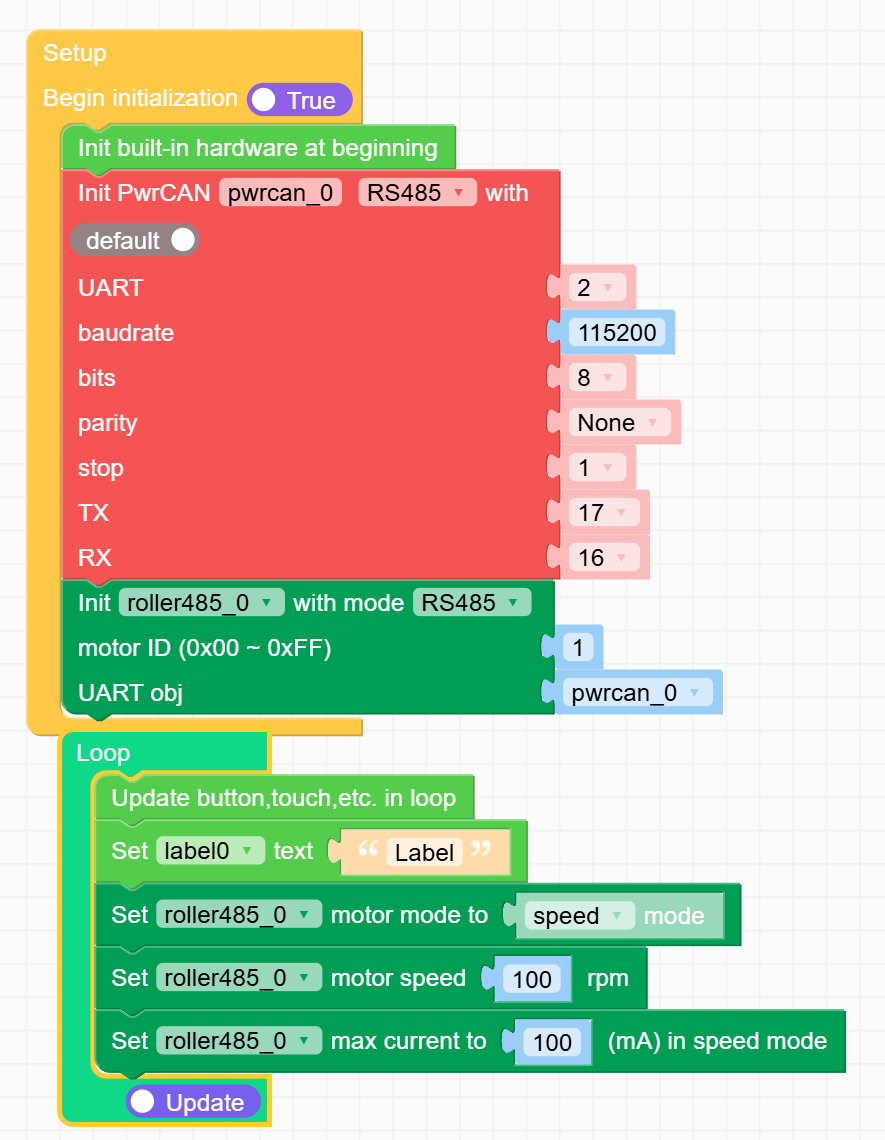
-
I also tried the example app at:
https://uiflow-micropython.readthedocs.io/en/develop/units/roller485.html
(see roller485_485_fire_example.m5f2 : https://uiflow2.m5stack.com/?example=https://raw.githubusercontent.com/m5stack/uiflow-micropython/develop/examples/unit/roller485/roller485_485_fire_example.m5f2)but it errors out:
E (10676) i2c: i2c driver install error
Traceback (most recent call last):
File "<stdin>", line 67, in <module>
File "<stdin>", line 43, in setup
File "unit/roller485.py", line 127, in get_motor_mode
TypeError: 'NoneType' object isn't subscriptableIt appears that the i2c error is benign.
Your help is appreciated.
Iorex -
@iorex I’ve had partial success using the Roller485 with the pwrCan module. Your setup looks similar to mine, except I’m using a Core3, so my pin numbers are different.
First, check whether your motor is in RS485 mode. The screen on the back should show COM: 485.
Second, make sure the motor ID is set to 1. The third line on the motor screen should read ID: 0x01.
Lastly, confirm that the motor’s baud rate is 115200 (this is the default).If all of the above is correct, you can move on to the pwrCan module. Did you flip the resistor for RS485 to the ON position? Are the DIP switches configured correctly?
I was able to control motor speed over RS485, but I still get the error: “Unexpected response length: 32, expected: 17.” It looks like there’s a communication issue from the motor back to the pwrCan module.
As an alternative, you can power the motor using the power pins on the RS485 terminal and send commands via I²C. It requires more wiring, but it works with much less hassle.
Hello! It looks like you're interested in this conversation, but you don't have an account yet.
Getting fed up of having to scroll through the same posts each visit? When you register for an account, you'll always come back to exactly where you were before, and choose to be notified of new replies (either via email, or push notification). You'll also be able to save bookmarks and upvote posts to show your appreciation to other community members.
With your input, this post could be even better 💗
Register Login