Adding Text to screen button causes any subsequent screen text writes to corrupt screen
-
I'm using an M5Stack Core2 AWS on a project where I need to use on-screen buttons:
Button BtnL(10, 190, 60, 40, false, "Dec", off_clrs, on_clrs, TL_DATUM);
//and:
BtnL.setLabel("Dec");
I have found that anytime I put any text into the button, the screen after the button is displayed (such as):
M5.Lcd.print(Line2.c_str());
// or
M5.Lcd.print(Line2);
the screen is corrupted and the only way that I have found to correct the problem is to reboot the Core2 device.
The corrupted screen looks like:
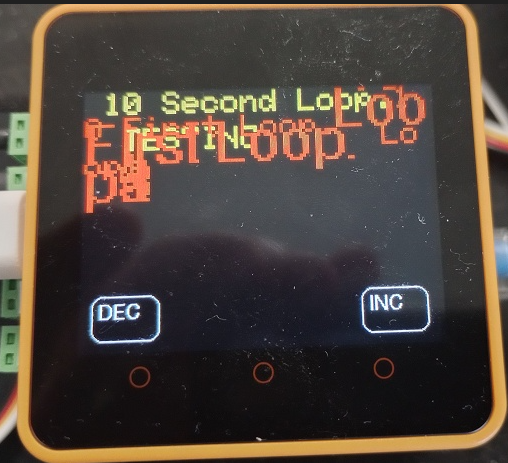
The only way I've found to use the on-screen buttons is to leave the button text blank and write the text above the screen button.
This very much appears to be a bug in the code.
Should I write this up as a bug on https://github.com/m5stack/M5Core2/issues/ ?Sir Michael
-
Hello @SirMichael
there is a mechanism trying to deal with this issue. Please see here.
That said, it did not work for me. What works is to set the relevant parameters every time before printing to the screen like below:
  M5.Lcd.setCursor(0, 10);
  M5.Lcd.setTextFont(2);
  M5.Lcd.setTextColor(TFT_YELLOW);
  M5.Lcd.print("hallo 2");
Thanks
FelixP.S.: M5Core2 library is deprecated and I haven't seen the person who wrote the library in the forums in a long time.
-
I had tried that. I had the exact same sequence but nothing that I would do would correct the corrupted screen. The only way was to reboot!
I would move over to the M5Unified.h, but I can't figure out how to create the same buttons:
Button BtnL(10, 190, 60, 40, false, "Dec", off_clrs, on_clrs, TL_DATUM);
//and:
BtnL.setLabel("Dec");
using the M5Unified.h library. The Touch examples are so obfuscated, I can't figure out how to get a simple button to work. I actually wrote up a bug report about this:
https://github.com/m5stack/M5Unified/issues/147By any chance, can you point me at an example that demonstrates the on screen button [wasreleased()] operation?
Sir Michael
-
I gave up trying to create on-screen buttons and figured out a way to use the A/B/C buttons using either
M5.BtnB.wasreleased()
//or
M5.BtnB.wasReleasedAfterHold()
I was also able to get it to compile under M5Unified.h. I'll try to proceed with that.
I still need to get the Deep Sleep to work under the M5Unified.h, but I'm getting there....
Sir Michael
-
Hello @SirMichael
if you are still interested - I figured out a way to create touch screen buttons using M5Unified and M5GFX library. Please find the example here.
Thanks
Felix -
Felix,
Thanks for the example. That helps.
The only thing that I'm missing with it is the commands to be able to ".erase" and show again. I tried to check the options (adding the "." and checking what options are available, but I didn't find anything that seemed like it would work.. I'm not sure how to erase, or would I just do a clear screen and recreate it?
I did play with it and added some line text, and it doesn't exhibit the same bug that the M5Core2 button graphics does when I wrote line and used the:
btn2.setLabelText("BUTTON");It doesn't mess up the screen text by making the existing text LARGER.
Thanks,
Sir Michael
-
Felix,
The only thing that I'm missing with it is the commands to be able to ".erase" and show again. I tried to check the options (adding the "." and checking what options are available, but I didn't find anything that seemed like it would work.. I'm not sure how to erase, or would I just do a clear screen and recreate it?
Sir Michael
-
Hello @SirMichael
I don't see any function which would hide and show a button either. I suggest you try either clearing the screen and recreate as you already mentioned or for only one button you could use
fillRect()with screen background color to make it hidden.Thanks
Felix -
Felix,
I had tried your suggestion, but the covered buttons would still re-act. With some more playing, I think that I could have gotten it to work, but I had re-designed the interface to use the
M5.BtnA.wasReleasedAfterHold());to substitute for the on-screen buttons.
I do sincerely appreciate your help!
Sir Michael
-
Hello @SirMichael
you are absolutely correct. Overwriting the button with a rectangle only removes it from the screen, but doesn't deactivate its touch function. You would need to deactivate the touch function in addition to drawing the rectangle. Sorry I've missed that.
Thanks
Felix

Hello! It looks like you're interested in this conversation, but you don't have an account yet.
Getting fed up of having to scroll through the same posts each visit? When you register for an account, you'll always come back to exactly where you were before, and choose to be notified of new replies (either via email, or push notification). You'll also be able to save bookmarks and upvote posts to show your appreciation to other community members.
With your input, this post could be even better 💗
Register Login