Display terminal (tty) on CoreMP135 buildin display
-
Hi,
I am running a CoreMP135 with the M5 debian image (kernel 5.15). I am interacting with the device over USB-C / serial tty. How can I show the tty terminal on the buildin display? If connect an external monitor via hdmi it will directly show a tty terminal on the external monitor, can i get the same output on the ILI9342C LCD?
Thanks
-
@johan_s You will need to create a program that to capture the the terminal and display it.
-
Hi @ajb2k3 can you elaborate?
I think it should be possible to get a terminal on the LCD using the tools provided by the linux distribution. What i gathered from searching on google, is that
fbconcan be used to display terminals on framebuffers (such as the ILI9342C). Unfortunately,fbconis not included in the CoreMP135 Debian image. I am now playing around with the CoreMP135_buildroot repo to see if I can compile it there. I will keep digging. -
@johan_s unfortunately I only know the theory and haven’t had much time to work on documentation as having to move my hose and office around. I started looking into the firmware and I/o control just didn’t get very far. I need to dig through not the Devicetree and display code.
Have you tried installing FBCon yet?
-
Hi @ajb2k3 , ok that makes sense, no problem.
Yesterday, I tried a to use the
fbtermbecause it is included in the Debian repo (easy to install with apt), but I unfortutaly I could not get it work.I have been looking for
fbconin the buildroot configuration menu but I have not been able to find it so far. But I have noticed that buildroot underkernel extensionsinclude an optoin to compileFB TFT drivers. I will try and recompile with the FB TFT drivers tonight.I will post updates here.
The CoreMP135 is a cool little device, but it is not as easy to use as the other M5 controllers.
-
@ajb2k3 OK, I figured it out using FbTerm, see my notes below. Just a note to temper expectations: The device is not very powerful (surprise). In my case, I am running Debian, connected to two tty terminals (ttyGS0 over USB-C and tty1 being shown in display), connected over WiFi dongle, and added a BT dongle for keyboard/mouse, and as a result the CoreMP135 very easily becomes sluggish and quite warm.
Anyway, here are my notes
Showing a terminal on the LCD TFT display
Very briefly:
- The CoreMP135 contains a ILITEK ILI9342C LCD TFT display with touch
- The Debian OS recognizes as the display as a framebuffer and makes it accesible at
/dev/fb1 - Low level interaction directly with
fb1is below, see examples below. In all the included examples, I was signed in asrootvia the USB-C interface (ttyGS0)
# signed in as root cat /dev/zero > /dev/fb1 # clear display cat /dev/urandom > /dev/fb1 # show random 'static' on display echo "HELLO WORLD" > /dev/fb1 # will show some extremely small in the top left corner - not discernible- The M5Stack CoreMP135 Debian image includes
fbv- a program for rendering.jpgon the framebuffer (TFT LCD). Example:
# signed in as root . /usr/local/m5stack/bashrc # prepare environment for using fbv /usr/local/m5stack/bin/fbv /root/mycoolpic.jpg # display .jpg on framebuffer, might only show part depending on jpg resolution- It is also possible to show a (somewhat) fully functional terminal on the TFT LCD display using the
fbtermprogram:
# signed in as root apt install fbterm # install FbTerm export FRAMEBUFFER=/dev/fb1 # Tell FbTerm to use fb1 as framebuffer fbterm -s 12 < /dev/tty1 & # Tell fbterm to diplay tty1 terminal on fb1 with size 12.- Connect a BT keyboard or similar and enjoy a somewhat functional terminal
- One final note: I added
rootto thevideogroup, although this should not be required.
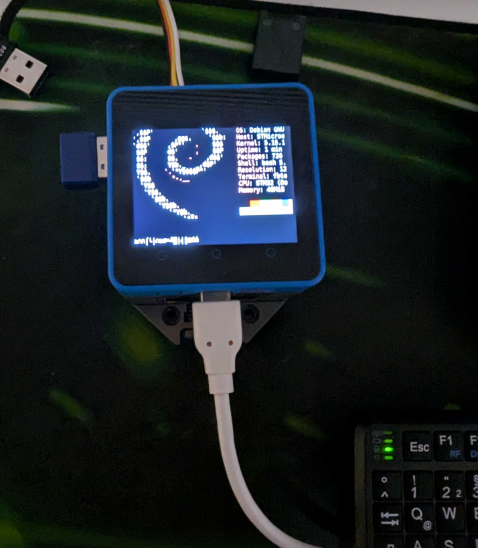
-
@johan_s I saw the export frame buffer on the CM4 stack but haven’t had time to look into it as moving around the house. Thanks for continuing the work in my steed
-
I haven't tested yet but on other devices I usually start programs from the serial console or SSH just by adding CLI arguments like this:
FRAMEBUFFER=/dev/fb1 <some command> -
@ajb2k3 no problem my friend
@prima I tried your suggestion but I can't really get it to work.
With the method I outlined the terminal works fine, but the keyboard input (USB keyboard) is not so reliable. It stop registering keystrokes after a short period. Not sure if the keyboard input get redirected to another terminal in the background or something.
-
@johan_s Hi John sorry for the long delay.
I had a chance to play with the frame buffer today after remembering this conversation.
I am finding the issue with the small text/garbidge written to the screen that you shared and looking into it.
Thanks for the point out.

Hello! It looks like you're interested in this conversation, but you don't have an account yet.
Getting fed up of having to scroll through the same posts each visit? When you register for an account, you'll always come back to exactly where you were before, and choose to be notified of new replies (either via email, or push notification). You'll also be able to save bookmarks and upvote posts to show your appreciation to other community members.
With your input, this post could be even better 💗
Register Login